Articles · 2026-08-25
How to put a signature inside a step
A hold point signature stops the job until someone signs it. That is the right tool for a stage gate, and the wrong one for a witness initialling a pressure test, or a crew signing on to a permit.
Stratum Track also gives you a signature as an ordinary answer in a row of the step. It locks no other question, and it records who signed that line and when.
This takes about two minutes.
What you need
- A manager login.
- A form with a step where the signature belongs.
Step 1: Add the row
Go to Templates, open your form with Actions, then Review. The form opens on the Preview tab.
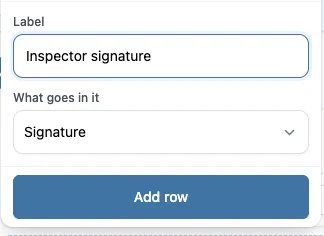
Find the step, press Add row, give it a label, and set What goes in it to Signature.
Step 2: Check where it landed
Press Add row in that panel, and Stratum Track adds the row to the table with the rest of the step. The cell reads Tap to sign, which is what your technician will see.
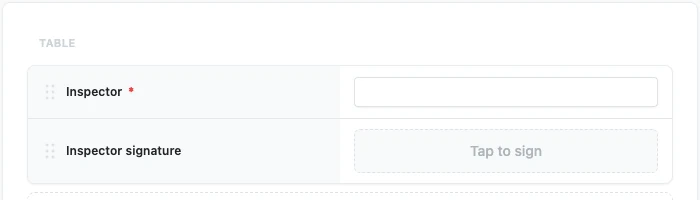
If the form is already in use by a job, Stratum Track holds your change as a draft. Press Activate Template and confirm when you are ready for your team to have it.
Step 3: Choose what it asks for
Click the Tap to sign cell, and its settings open in the panel beside the form. Under What this signature asks for, choose whether Stratum Track also collects a printed name and a position beside the mark, and whether a printed name must be typed. Turning those on keeps the name attached to the signature. Turn on Required in the same panel if the step must wait for this signature, then press Save changes. The Structure tab has the same settings on the field's card.
Step 4: Sign it on the job
On the job, tapping the cell opens a signing box. Use a finger on a tablet or a mouse on a laptop.
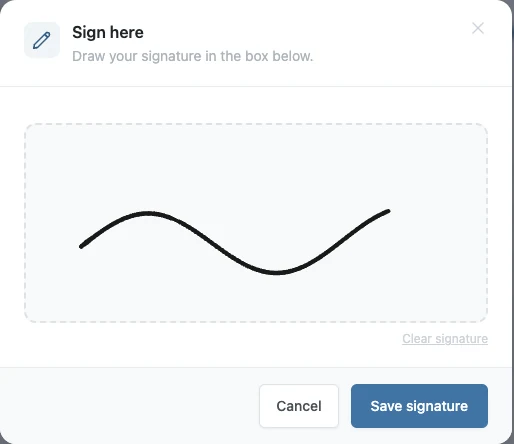
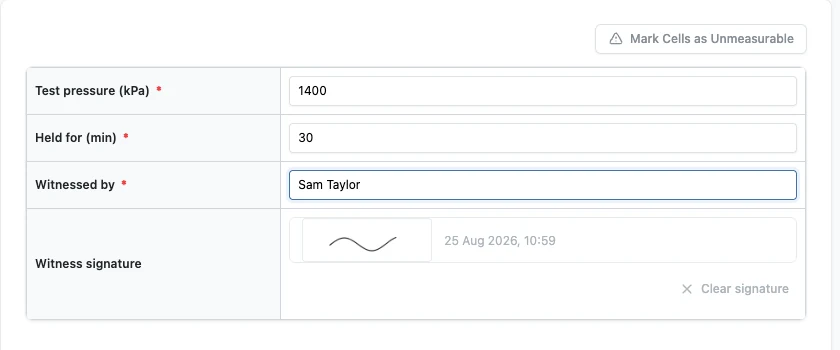
Press Save signature and the mark appears in the row. The time is recorded when the step is saved, and is shown beside the mark. Clear signature removes the mark if the wrong person signed, and it asks you to confirm first.
Worth knowing
- The time is recorded when the step is saved, not when the pen came off the screen.
- It makes the step wait only if you mark it Required. A Required signature has to be signed before Next Step submits the step. Use a hold point when the questions below it must stay locked until someone signs.
- You can have more than one on a step. A witness and a supervisor, on their own rows.
- Ask for the printed name on the signature itself. It prints with the mark, so you do not need a separate row for the name.
Common questions
How is this different from a hold point?
A hold point locks the questions below it until a supervisor signs it, and the job stops there until they do. A signature field is an ordinary answer on the step, which Stratum Track records and prints on the report. If you mark it Required, the step cannot be submitted until it is signed, the same as any required answer.
Can the same person sign twice on one job?
Yes. Each signature field is its own answer, so the same person can sign a row on one step and another row on a later step, or two rows on the same step. Stratum Track records and prints each one on the report. If the wrong person signed one of them, Clear signature on that row removes that signature alone.
Can a signature be cleared after it is saved?
Yes, with Clear signature on that row. Stratum Track names who signed and when, so you can see whose mark you are about to remove, and asks you to confirm before it removes it. The row is then empty and can be signed again. If you marked it Required, Next Step waits for the new signature before it submits the step.