Stratum Track

Your team shouldn't be writing reports.

Send us a completed report, whether that's a strip report, an inspection report or a test certificate, and Stratum Track builds the technician workflow and the branded client report from it. Your team captures photos, checks, measurements and sign-offs on the floor or on site. The client report generates the moment the job is done. Built for engineering workshops and inspection providers in mining, oil and gas, and heavy industry.

▶ ISO 286 H8 · LIVE
⚑ HOLD POINT · WITNESS
JOB-2026-0411 09:42
Bore & weld inspection
TECH: ISO 9712 L2 · ASSET: HSG-102A
PlaneM1M2M3M4Status
A120.018120.022120.019120.021PASS
B120.020120.017120.023120.018PASS
SPEC H8 · 120.000 +0.054 / -0.000 WITHIN H8 ✓
MT · AS 1171 · W1-W4 · NRDD CAL CHECK 09:40 ✓
Consistency

Same job, same standard, whoever is on it.

Stratum Track puts your standard into the job itself, so the workflow walks the technician through each step and won't let the work move on until it's done. A new starter turns out a job to the same standard as your best.

Every step
Enforced, in order

The workflow takes the technician through the job and won't let it close with a step skipped.

Every photo
Captured, not chased

Your team captures photos, measurements and sign-offs as the work happens, so when an assessor asks how you know, the record is already on the step.

Training
Built into the job

The job guides the technician through the right steps, so new starters reach your standard faster.

What it does

Three things it does.

01

Instant reports from captured data

The client's copy comes out of the job itself, in your format. Nothing to collate, nothing to copy across, and no Friday afternoon lost to formatting.

02

The standard, built into the job

You set the tolerances, the acceptance criteria, the hold points and the required photos, and Stratum Track applies them as the job runs. The standard isn't left to one person to catch.

03

Made for the floor and the field

Designed for tablets in dusty workshops and out on site. Big tap targets, simple flows, no menus to memorise. Greasy hands welcome.

How it works

From your report to a signed-off job. Five steps.

01

Send

Send us a completed report you produce by hand today, or describe a job your team runs every week.

02

Draft

Stratum Track builds the workflow from it: stages, fields, required photos, checks, hold points and the report style.

03

Approve

Your team reviews and approves the template. Nothing goes live until you say so.

04

Capture

Technicians scan a QR code and capture the job on a tablet. Photos, checks, measurements, sign-offs.

05

Generate

Close the last step and the branded client report is there, signed and time-stamped, ready to send.

Draft Reviewed Approved Live

AI helps us set the workflow up. We draft it from your report, your team reviews it and signs it off, and only then does it go live. Once it's running, every report is built from what your technicians capture on the floor. The measurements, the photos and the sign-offs are theirs, not generated by AI.

Inside Stratum Track

A closer look at the features that earn their place.

Seven things Stratum Track does that a spreadsheet, a paper job sheet, or an off-the-shelf job system never will.

01 · Tolerances

ISO 286 tolerances, calculated for you.

Stop looking up values on separate sheets and copying them onto job forms. Stratum Track holds the ISO 286 reference data, calculates the tolerance for any nominal size and class automatically, and checks the measurement against spec the moment it's entered.

Pass or fail, in real time. The technician just measures. Instrument IDs are captured with the job, so the report shows which gauge took the reading.

ISO 286Auto complianceReal-time
Dimensional check step of a pulley strip and assess job: nominal bore and fit class with the ISO 286 limits worked out from them, and four bore readings around the housing against those limits. Dimensional inspection
02 · Evidence

Every photo the job requires.

Photos are required, not requested. Stratum Track marks every shot the job needs and won't let the work progress until it's captured. Each photo carries the technician's name, the date, and the job number embedded in the file.

Add as many supplementary shots as you need. Download the whole set whenever you want. It's your data.

Mandatory captureEmbedded metadataBulk export
Indication log step of a weld inspection: three photograph slots across the row, two filled and one waiting, with a guide note, and the indications logged in a table against them. Photo · Gearbox external view
03 · Sign-off

Hold points that stop the job.

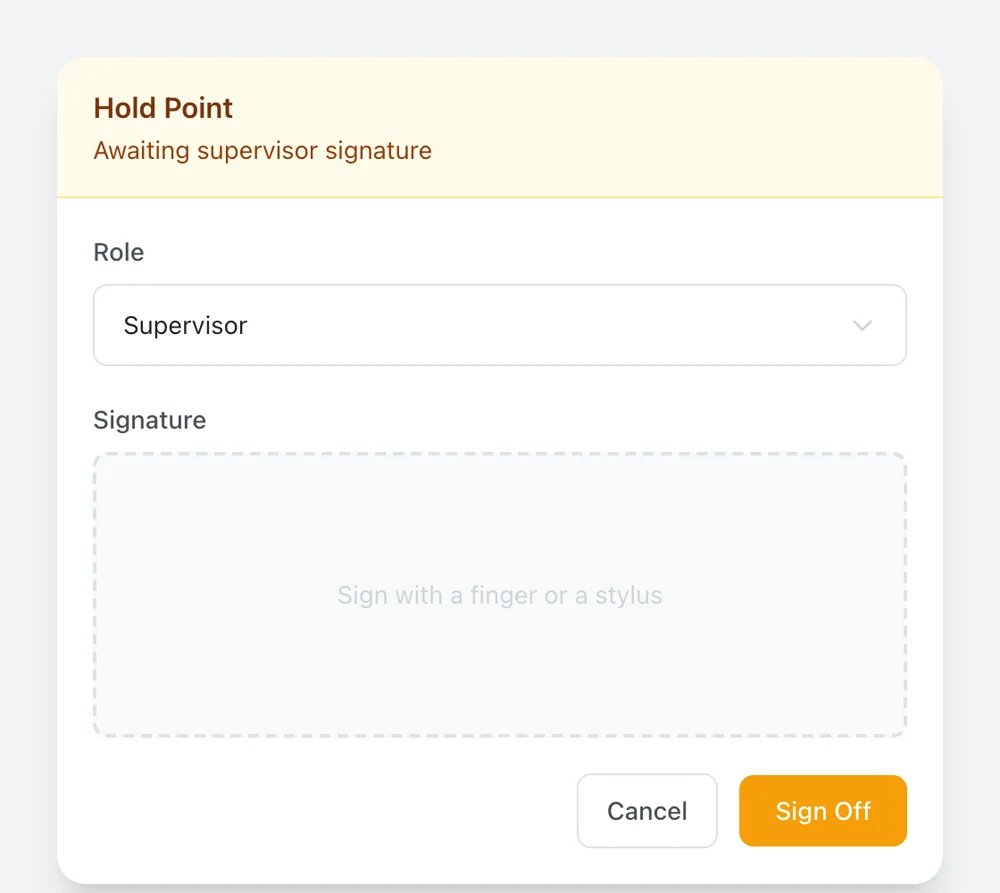
Put a hold point anywhere in a step, and as many as the job needs. When your technician reaches one, the work below it locks, and they hand the tablet to whoever has to sign: a supervisor witnessing a fit-up, a client's representative, or the senior signatory who countersigns every report before it goes out.

You decide who that is. The signature is captured, time-stamped and embedded in the final report. Clear for an audit, clear for the customer.

Hold pointsOn-screen signatureTime-stamped
Witness hold point on a job: the checks completed before it, an amber hold point awaiting supervisor sign-off, and a note that the steps below stay disabled until it is signed Hold point signature: an amber panel headed Hold Point, awaiting supervisor signature, with the role, a signature pad and a Sign Off button. Hold Point + Sign-off
04 · Access

Scan the code. Get to work.

Every job pack carries a QR code. Technicians scan it on a tablet, enter their employee number, and they're working on the right job in seconds.

No login screens and no menus to navigate. Nobody has to ask which job is theirs.

QR-firstNo menusSelf-service
The QR code panel for a job: the job number, a printable QR code, and a note that says to print it and attach it to the job sheet so fitters scan to log in. Job QR · scan to log in
05 · Workflows

Workflows shaped to your operation.

New, in progress, completed, reviewed, archived. Five stages, and they've covered every trade we've put through them: repair workshops, NDT, coatings and dealership service.

Every job, every site, in one view. We set it up with you, and Stratum Track holds it from then on.

Five stagesMulti-siteOne view
The jobs dashboard: counts across Total, New, In Progress, Completed and Reviewed, then each section listed out. Every row carries the job number, the client, the template, the order, material and serial numbers, and how far through the job is. Dashboard · Live job status
06 · Safety

A Take 5 before every task. No paper, no missed steps.

A paper Take 5 lives in a booklet that gets lost, damaged or left in the ute. Stratum Track puts it on the tablet, one tap from the home screen. Workshop, job, work area, hazards, controls, sign-off. Done in a minute, before the spanner comes out.

Every Take 5 is logged against the technician, the job, and the time. Supervisors see completion in real time. Auditors get the trail without rifling through booklets.

Digital pre-task checkLogged & timestampedOne-tap entry
Take 5 pre-task risk assessment, step 1 of 4: workshop, an optional job, the location or work area, and a task description. Take 5 · Step 1 of 4
07 · Visibility

Watch jobs unfold from the office.

Project managers watch a job progress without ringing the floor. Measurements, photos, hold-point sign-offs and notes show up as the technician saves them.

That means a workshop can have quotes out and parts on order before the job is handed back, and an inspection manager sees a failed item the moment it's called, not when the paperwork lands days later.

Live job feedReal-time visibilityFaster quoting
A job is still on the floor and you can already see the measurements, the photos and the sign-offs. The quote can go to the supplier and the parts can be on order before the job is back on your desk.
What the office sees while the job is still on the floor
Who it's for

Built for the workshops and inspection teams that keep heavy industry running.

Workshops

Engineering workshops in mining, oil and gas, and heavy industry.

Pump and valve overhauls. Gearbox and drivetrain rebuilds. Rotating equipment. Structural and fabrication work. Fixed-plant shutdowns. The day-to-day work that keeps fixed plant turning.

Pump & valve overhaul Gearbox & drivetrain Rotating equipment Structural & fabrication Hydraulic & cylinders Fixed-plant shutdowns OEM repair Blast & paint Dealership service Take 5
See it for an engineering workshop →
Inspection & testing

NDT and inspection providers.

From family-run UT, MT and PT firms to multi-site NATA-accredited labs. Send us one of your test reports and we rebuild it as a guided workflow. Technique details and results go in on the tablet, the required photos have to be taken, and nothing is issued until your authorised signatory signs it. Your report format comes out at the end.

UT · MT · PT · RT Weld inspection Thickness surveys Lifting gear Coverage & restrictions Two-stage sign-off
See it for an NDT provider →
Coatings and surface treatment

Blast, paint and corrosion control shops.

Everything that decides whether a coating lasts is invisible once the topcoat is on, so the record is the proof. Stratum Track captures the surface prep, the profile, the ambient readings and the film thickness on the step they belong to, holds the step open until your inspector takes the photographs the template calls for, and generates the client's report from all of it.

Surface prep Blast profile Dew point & ambient Wet & dry film thickness Adhesion Holiday & chloride testing Inspector sign-off
Field service

Field service teams.

Same reporting discipline, out at the asset. Your technician captures the inspection, the photos and the sign-offs on a tablet where the work is. Stratum Track needs a network connection, and we will tell you straight if your sites have not got it.

On-site inspection Mobile capture Photo evidence

Working to a client's inspection test plan, or getting ready for an assessment? Inspection test plans and audit evidence.

What changes

What Stratum Track is built to change.

Report turnaround

Finished with the job, not after it

Report admin

Off your senior people

Quoting

Parts on order before the job leaves the floor

The pilot

How a pilot works.

One site, your report format, your data always, and a real say in what we build next. We agree the term with you on the discovery call.

01

Send us a report

We turn one of your completed reports into a draft workflow and report template, ready for your team to review. One workshop or lab, one or two job types.

02

We set it up with you

Your spec sheets, your terminology, your report format. We do the configuration around how your operation runs. Your team focuses on the floor.

03

Your data, always

Photos, measurements, sign-offs, reports. All exportable, all yours. No lock-in, and no surprises if you ever want to leave.

04

Shape what we build

Your needs drive what we build next. The product gets more useful for your operation with every release.

FAQ

The questions we get most.

How long does it take to go live?

The pilot runs for 30 days. Configuration and tablet rollout typically take the first week, so you can expect your first automated reports inside two weeks of kick-off.

What happens to our existing report formats?

We keep them. Stratum Track is configured to your existing templates, your existing branding, and your existing terminology. Clients receiving the reports won't see a difference, except the reports will arrive faster and be more consistent.

Can our clients see the reports themselves?

Your client gets the report, not a login. It generates as a branded PDF when the job closes and you send it the way you send it now. There is no client portal to sign into, and we would rather say so than let you find out in a demo. The format is the same every time, so whoever opens it knows where to look.

Who owns the data?

You do. Photos, measurements, sign-offs, reports. All exportable, all yours. We don't hold your data hostage. If you ever want to leave, we hand it all back in a usable format.

Is it ISO compliant?

Stratum Track enforces the standard you configure. ISO 286 dimensional tolerances are built in, and acceptance criteria from your own procedures and specs are enforced the same way. Hold points, photographic evidence, and sign-offs are built around what auditors look for. We work to ISO 27001-aligned operational practices on our own infrastructure.

Our report formats are controlled documents under our accreditation. Can you keep them?

Yes. Stratum Track generates your report, not ours: your layout, your logo, your accreditation marks, your fields, reproduced from the report you send us. Nothing about your accreditation changes. Your procedures, your signatories and your quality system remain the authority, and the document your client receives is still your controlled document. We just make sure it's filled in from what was captured on the job, not retyped afterwards.

What does it cost?

We discuss pricing on the discovery call once we understand the operation, the job mix, and the volume. We don't publish prices on the public site because the right number depends on the operation.

Get started

Send us a report.

Send us one completed report: a strip report, an inspection sheet, a test report. We'll turn it into a draft Stratum Track workflow and a branded sample report, built on your own job and not a generic demo, then walk you through it.

  • A draft workflow built from your own report
  • A branded sample report in your format
  • A straight answer on whether it's the right fit

Client details in your report? Redact them, or send a blank report template. The layout is all we need. If you'd rather we sign an NDA first, just say so in the message.

We use your report only to build your draft. We don't train models on it. How we handle your data. For files over 4 MB, email hello@stratumsoftware.io.

Built by Stratum Software. The same engineers who build Stratum Track also help other companies take software from prototype to production.
See our services