Articles · 2026-09-18
How to share a field between forms and update it in one place
The same question often sits on a dozen forms, and each form holds its own copy of it. Adding one option to a dropdown means opening every one of those forms, and a form that is missed keeps the old list. We have seen one question carry three different option lists across those forms, so the same answer was recorded three different ways.
Stratum Track lets you set the question up once as a common field, add it to any form, and change it in one place for every form that uses it.
Setting one up takes about five minutes. Every change after that is one save.
What you need
- A manager login. Common Fields is in Settings, and only a manager can open it.
- A computer. The template editor is built for a desktop screen.
- A question you ask on more than one form, such as an oil grade, a paint system or a motor frame size.
The example below is an Oil Grade dropdown asked on four gearbox forms.
Step 1: Make the common field
Go to Settings and open Common Fields, under Job Data. Press New common field.
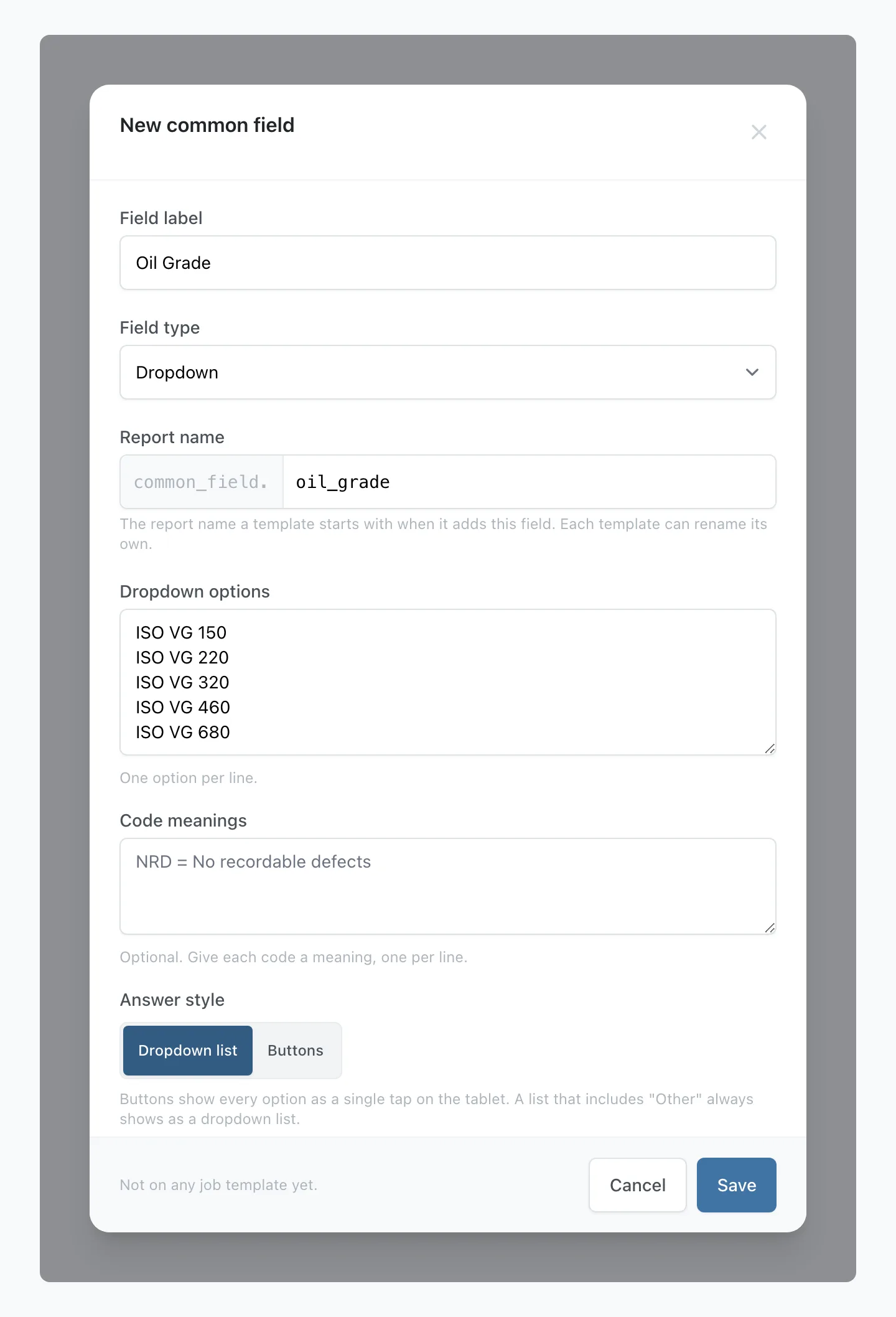
Type the question in Field label and pick the Field type. For a dropdown, type the Dropdown options one per line, then set Code meanings, Answer style, Option colours and a Starting value as you would on any form.
Report name is the name your report document uses for the answer. Stratum Track fills it in from the label and adds common_field. before it, so this example prints as common_field.oil_grade. If you change it, use lower-case letters, numbers and underscores, starting with a letter. Press Save.
Step 2: Link the forms that already ask it
Press Edit on the new field. Under Same field on other templates, Stratum Track lists the fields on the live forms you can edit that ask the same question with the same field type and are not linked yet. Also offers lists an option on that form that the common field lacks. Does not offer lists a common field option that form lacks.
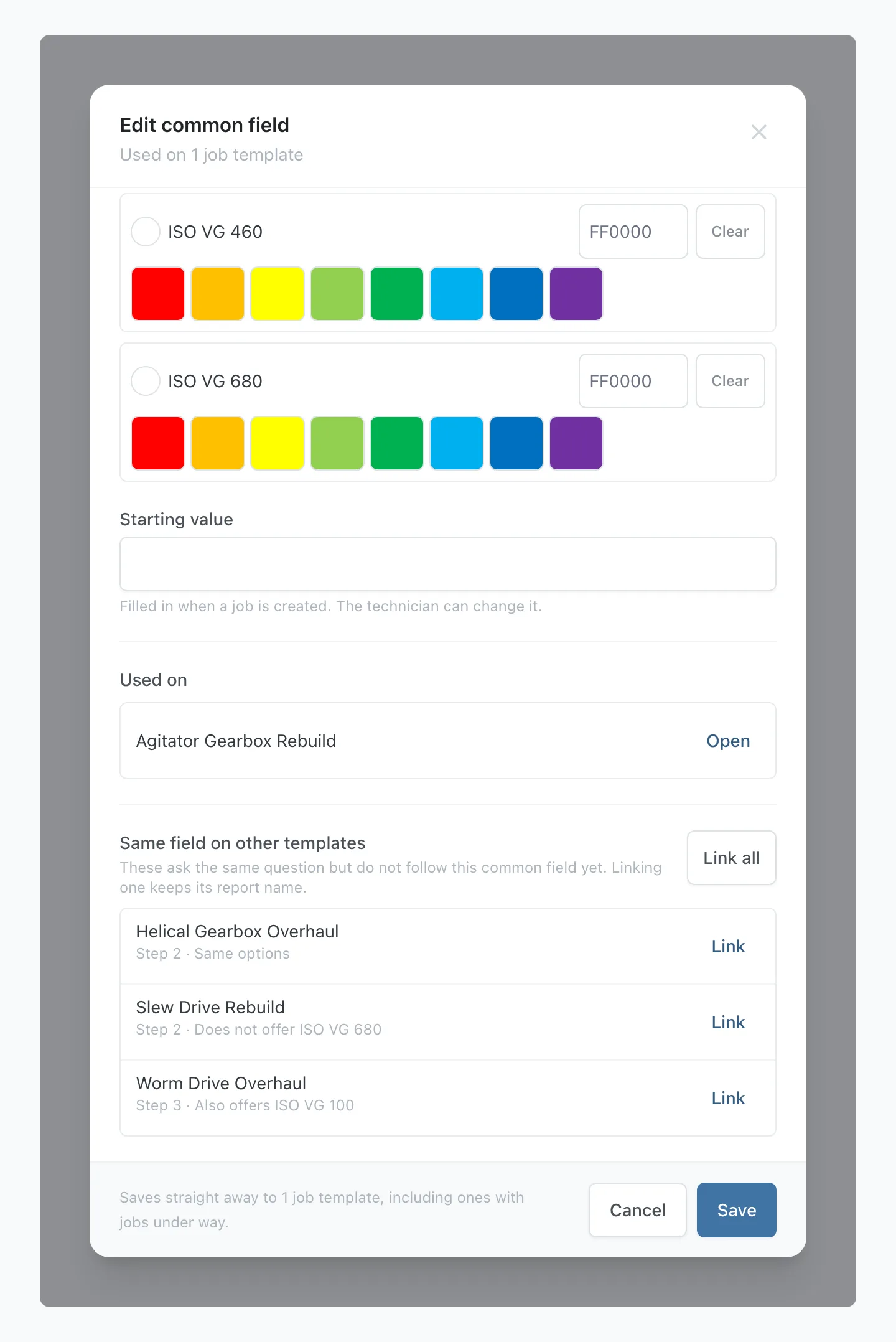
Press Link on one form, or Link all. Before anything is saved, Stratum Track shows what linking changes. Each field takes the common field's label, type and options. If the field is a row in a two-column table, the row heading keeps the text you wrote. Where linking removes an option from a form, Stratum Track tells you how many jobs have recorded it. Those jobs keep their answers.
The list matches on the words of the label, ignoring capitals and extra spaces, so a field labelled Lube Oil Grade will not appear. Open that form on the Preview tab, select the field, and press Link to a common field. The same window offers Make this a common field, which creates a new common field from that field's label, type and options. On a form with a draft open, the link is saved to the draft.
Step 3: Add it to another form
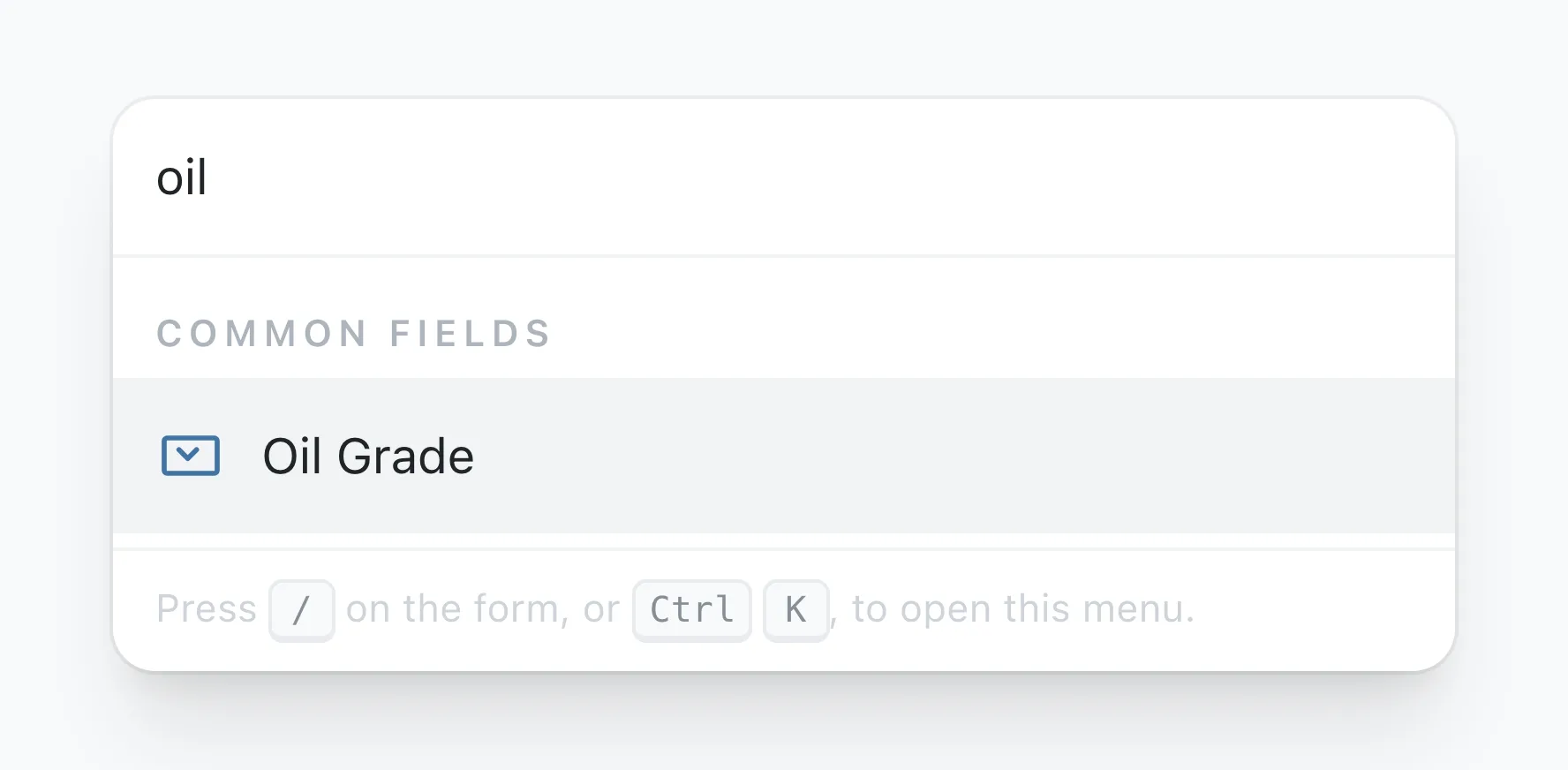
On the form's Preview tab, press Add to this step and pick the field from the Common fields group in the list. To add it as a row of a two-column table, pick it from the Common fields group under What goes in it.
On a form that already has jobs, Stratum Track adds the new field to the draft like any other change. Those jobs get it when you press Activate Template.
Each form gets its own report name. The first copy prints as common_field.oil_grade, and a second copy on the same form prints as common_field.oil_grade_2. You set Required and any visibility rule on each form.
Step 4: Change it once
Open the field from Settings, or press Edit common field beside it on either tab of the template editor. A new option, a colour, a code meaning, the answer style or the starting value saves straight away.
Removing an option, renaming the question or changing the type opens Check before saving first. It lists each change, how many jobs have recorded any option you are removing, and the forms it will save to.
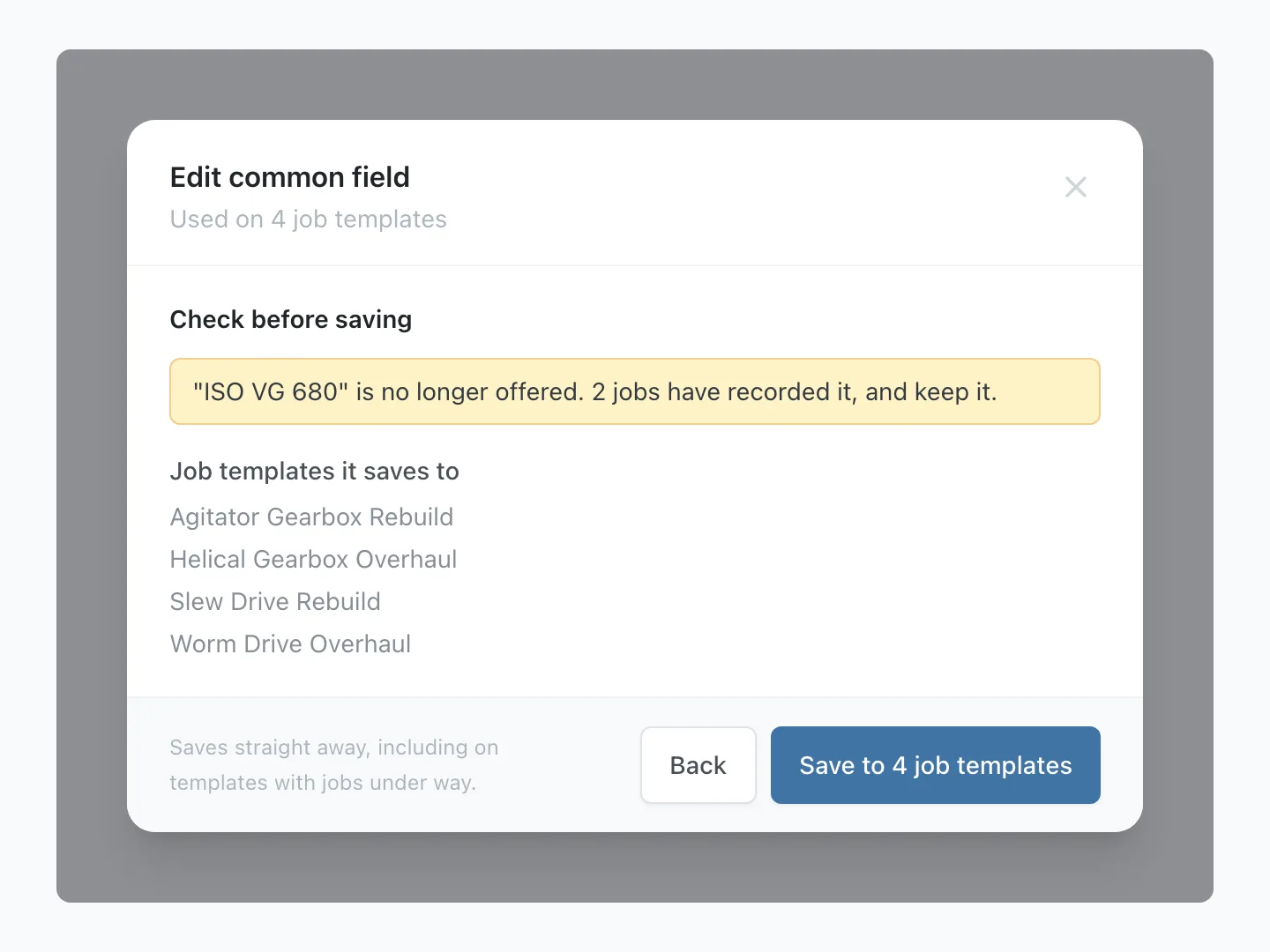
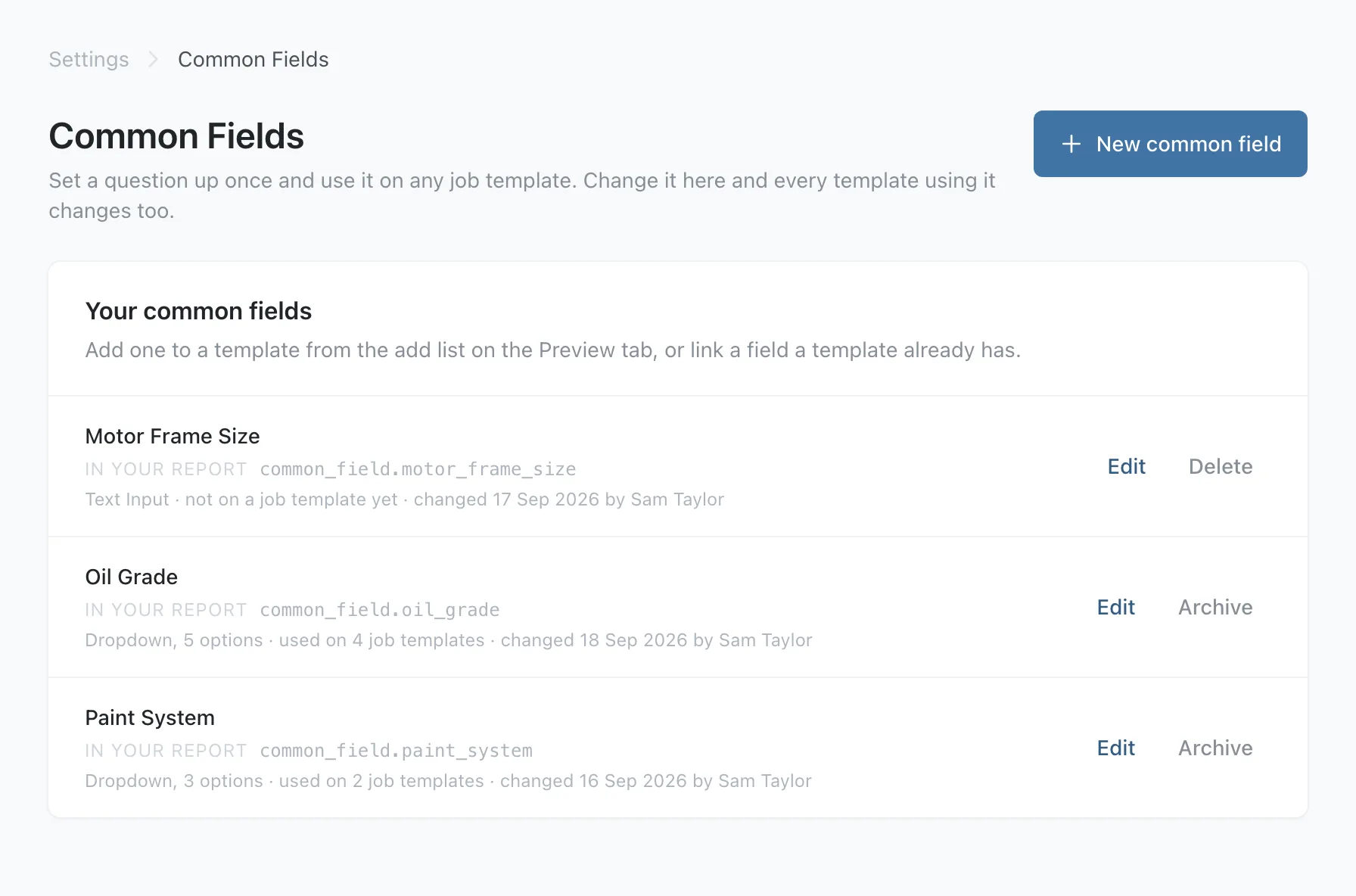
Press Save to 4 job templates. Stratum Track saves the change to every form using the field at once, including forms with jobs under way, with no draft to activate.
Worth knowing
- Not every field type can be shared. Text Input, Text Area, Number, Decimal, Measurement, Date, Time, Dropdown and Yes/No can. Photos, signatures, lookups, calculations and specifications are set up on each form.
- A common field is a field on its own or a row in a two-column table. A cell in a grid or a repeating table is named by its row and column, so it cannot be linked. A field from a step template is linked on the step template.
- The type and the report name lock once they are in use. The type is fixed once jobs have recorded answers, and the report name once a form uses it. A field in use can be archived but not deleted, and the forms using it keep it.
Common questions
Does changing a common field affect jobs already under way?
Yes. Stratum Track saves the change to every form using the field, including forms with jobs under way, so a technician partway through a job sees the new options the next time they open that step. An answer already recorded stays on the job even if you remove its option. The form shows it marked (no longer offered), and saving that step again does not clear it.
Will my report documents still work after I link a field?
Yes. Linking changes the question, the type and the options. The report name stays as it was, so a Word report document that already prints that field keeps printing it. Only a field you add from the Common fields group gets a new common_field. name. The form's Field Reference page marks each linked field with a Common field tag.
Can I take a form off the common field later?
Yes. On that form, select the field and press Edit common field, then Unlink this field. Stratum Track keeps the label and options the field has at that moment and makes it an ordinary field on that form, which you edit there like any other. The common field and every other form using it stay as they are. On a form with a draft open, the unlink is saved to the draft and reaches jobs when you press Activate Template.
Do I need to ask you to switch this on?
No. Common Fields is in Settings for every company, and any manager can set one up today. If you would rather we did it with you, send us the forms that ask the same question. We will set up the common fields, link the forms and hand them back for you to approve.