Articles · 2026-09-25
How to submit finished steps automatically
Stratum Track saves every answer as the technician types it, but it does not submit the step until someone taps Next Step. On a job that enforces step order, which is the default, the next step stays locked until then, so whoever does the next part of the job cannot start it. Stratum Track tells your technician when a step is finished, asks before they leave it unsubmitted, and can submit it in their name once it has been finished for 30 minutes.
You set this up once for the whole company, and it takes about a minute.
What you need
- A manager login. Only a manager can change Step Submission.
- Required questions on your forms. Stratum Track counts a step as finished when every required question is answered, and it never automatically submits a step that has no required questions.
Step 1: Open Step Submission
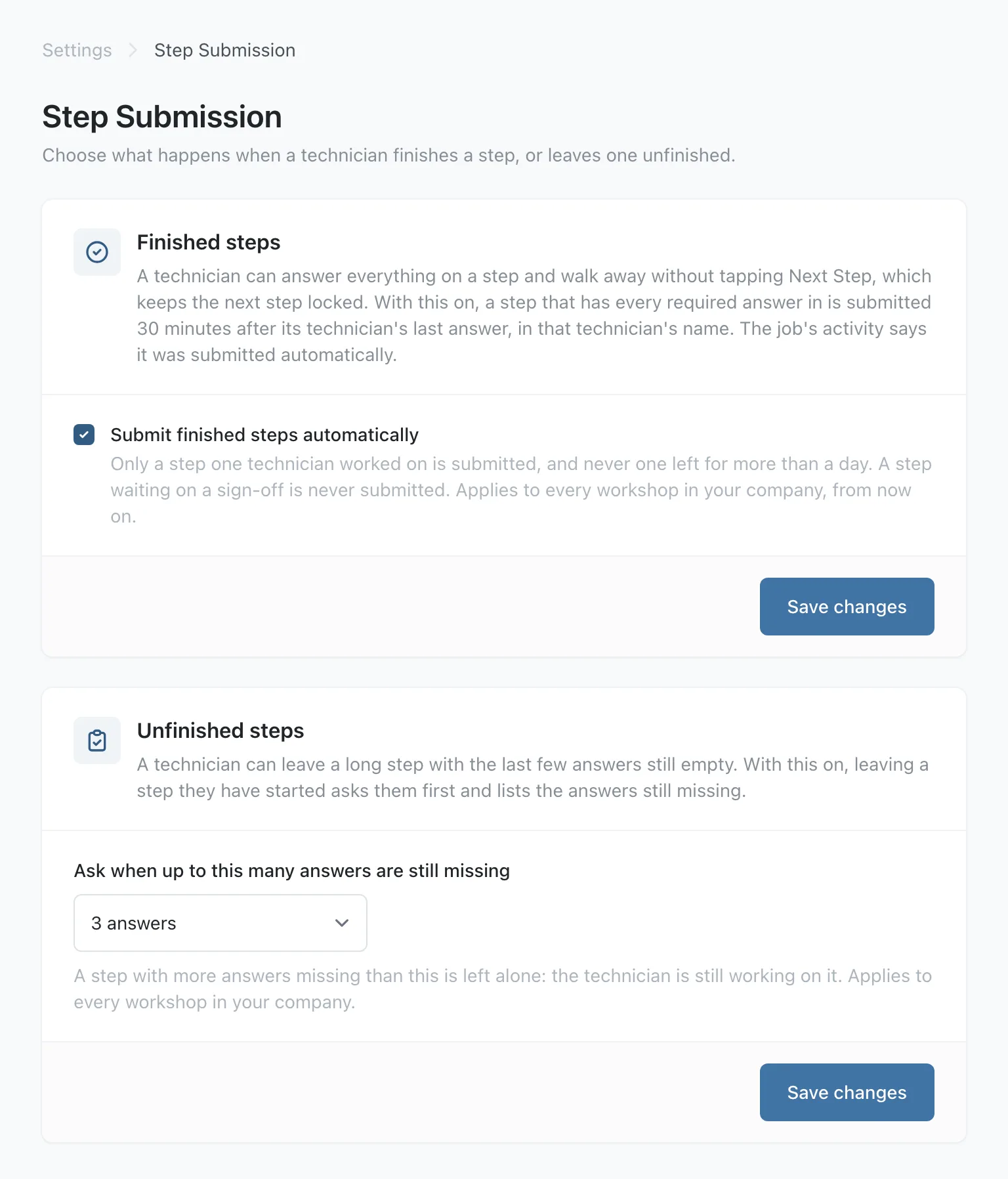
Go to Settings and, under Job Defaults, open Step Submission. The page has a Finished steps card and an Unfinished steps card, each with its own Save changes button.
Step 2: Turn on automatic submission
On the Finished steps card, tick Submit finished steps automatically and press Save changes.
From then on, Stratum Track submits a step in its technician's name once the step has been finished for 30 minutes and the technician has not answered anything on it for 30 minutes. It does this only when all of these are true:
- Every required question on the step is answered, and every hold point on the step is signed.
- It is the job's current step, and no hold point on an earlier step is waiting for a sign-off.
- Only one technician has worked on the step, and their login is still active. If a supervisor changed an answer on it, Stratum Track leaves it for a person to submit.
- No answer on the step is still marked as copied from the last job, on a job cloned with its data.
- The technician's last answer is less than a day old, so Stratum Track does not submit a step that has waited for days as soon as you turn this on.
The job's activity records it as Step submitted automatically, with the step number and the minutes since the last answer. If it was the last step, Stratum Track completes the job and sends its supervisor the same notification a technician's Complete Job sends.
Step 3: Choose when to remind about missing answers
On the Unfinished steps card, open Ask when up to this many answers are still missing, choose a number from 1 answer to 10 answers, and press Save changes.
When a technician taps a link, a step in the step list or Sign Out on a step that has been started, with that many answers or fewer still missing, Stratum Track asks first and lists them. Stay and finish takes them to the first missing answer. Leave it for now lets them leave the step, and every answer they gave is already saved. After Sign Out, that button reads Sign out.
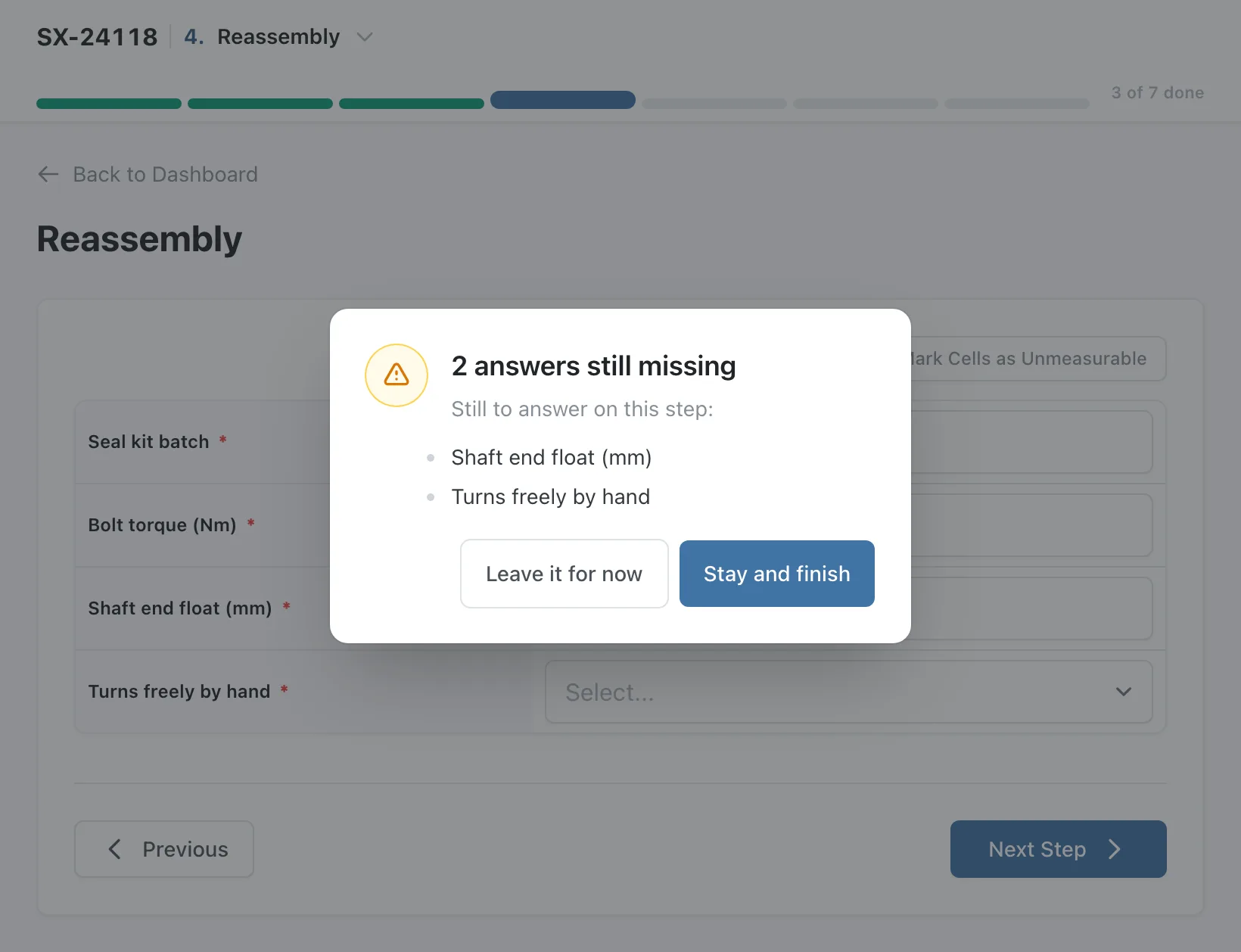
Stratum Track leaves a step alone when more answers than your number are missing, because the technician is still working on it. It does not ask on a step nobody has answered anything on yet, and it does not count an answer waiting behind an unsigned hold point.
Step 4: Check it on a job
Open a job and answer every required question on a step. When the last one is answered, a note under the step bar reads Everything is answered. Tap Next Step to submit it. On the last step it names Complete Job instead. The note disappears if an answer is cleared.
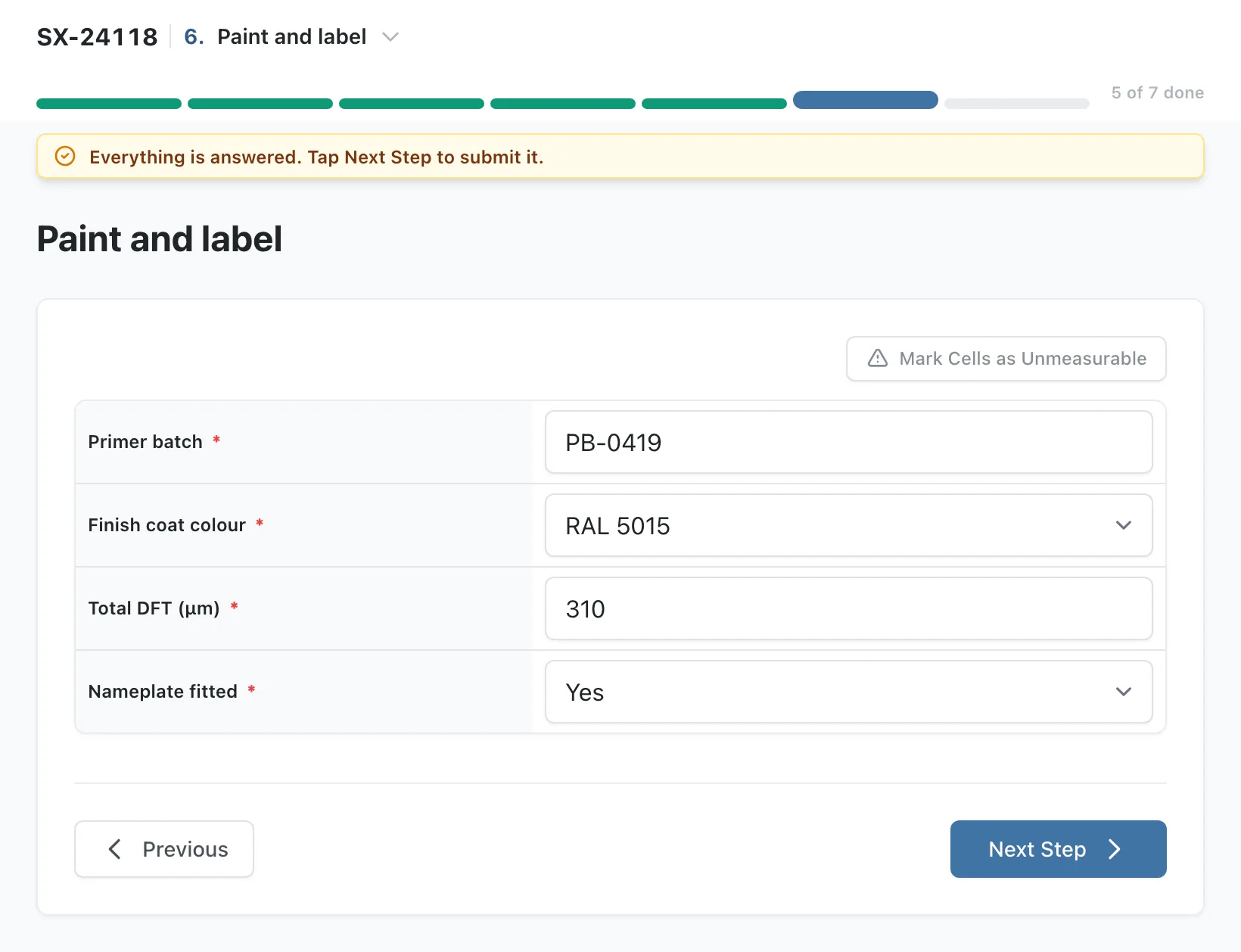
If the technician then taps a link, a step in the step list or Sign Out, Stratum Track asks Submit this step first? Submit the step does what Next Step does, and Leave it for now lets them leave without submitting.
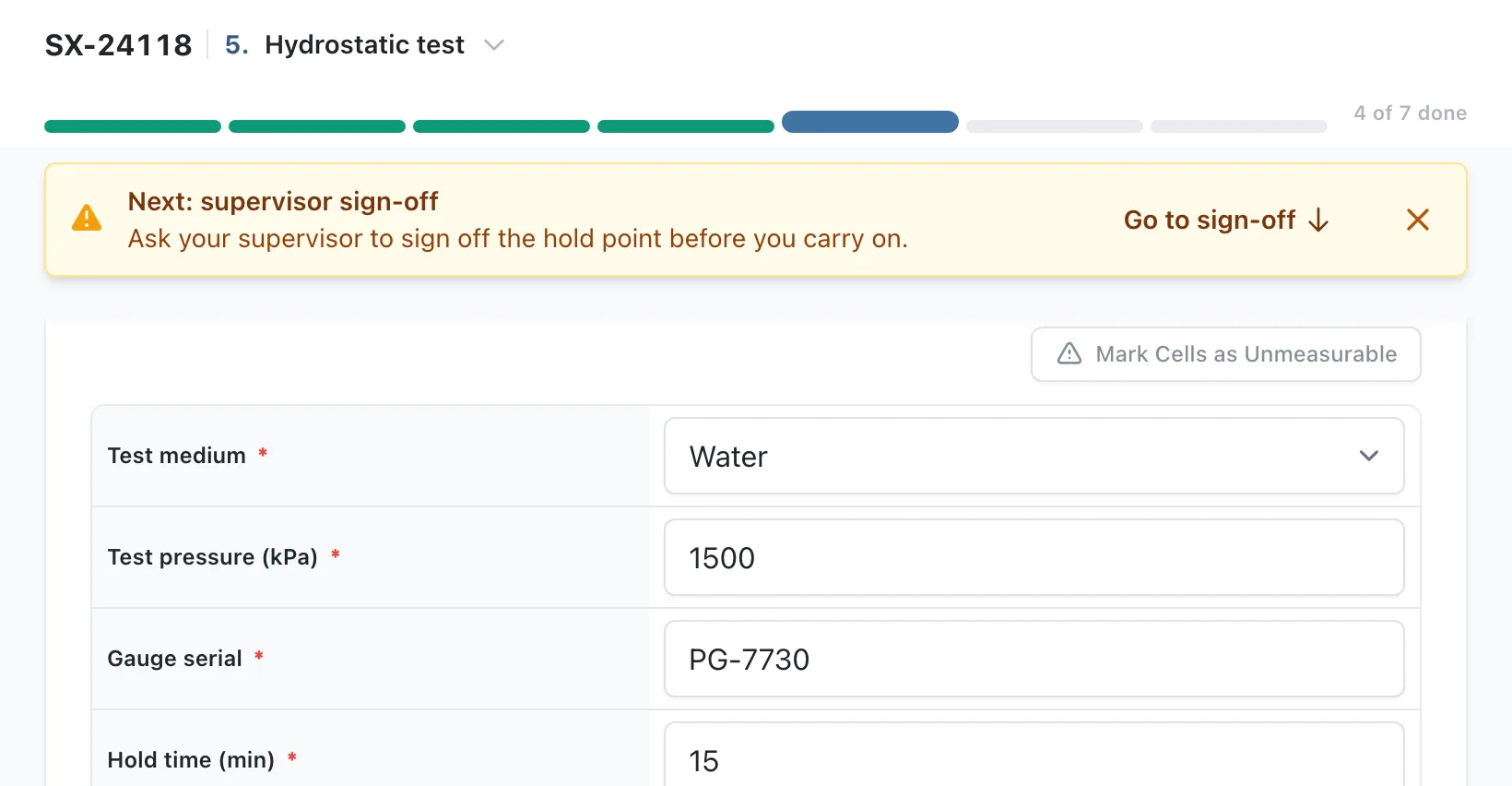
On a job with hold points, when the technician answers the last question above a hold point that is off the screen, a strip names the sign-off that comes next, such as Next: supervisor sign-off. Go to sign-off scrolls to the hold point, so they can fetch the supervisor before they reach the locked questions.
Worth knowing
- Save changes saves one card. Pressing it on one card discards an unsaved change on the other, so save each card before you change the next.
- Only some ways of leaving a step ask first. Stratum Track asks when the technician taps a link, a step in the step list or Sign Out. Previous, the browser's back button and closing the tab do not ask.
- A step finished by a sign-off waits 30 minutes from the sign-off. Stratum Track also counts the 30 minutes from when it first sees the step finished, so a step whose last answer was at 10:00 and whose hold point was signed at 11:00 is submitted at about 11:30.
Common questions
Whose name goes on a step Stratum Track submits?
The technician's. Stratum Track records the step in the name of the one technician who worked on it, the same name a tap on Next Step would record. The job's activity lists the entry under their name as Step submitted automatically, followed by the step number and how many minutes after their last answer it happened.
Will it submit a step that is waiting on a sign-off?
No. Stratum Track submits a step only when Next Step would accept it: every required question answered, every hold point on the step signed, and no hold point on an earlier step still waiting. On a job with hold points, your technician also gets a strip naming the sign-off that comes next, with a Go to sign-off button, so they can fetch the supervisor when they answer the last question above the hold point.
What if the technician comes back within 30 minutes?
Nothing changes for them. Each new answer restarts the 30 minutes, and Next Step still submits the step at once, so a technician who comes back and taps it submits it themselves. Stratum Track checks for finished steps every five minutes, so an automatic submission happens within a few minutes of the 30 minutes passing.
Does the reminder stop a technician leaving a step?
No. It asks and lists what is missing. Leave it for now lets them leave, and Stratum Track has already saved every answer they gave, so nothing is lost if they need to fetch a part or a gauge first. You choose the number, so Stratum Track only asks on a step with the last few answers missing. If you are not sure what number suits your forms, send us one and we will suggest a number that fits it.
Do I need to ask you to switch this on?
No. Any manager can turn on both settings under Settings, Step Submission, and they apply to every workshop in your company once you save. Both are off until you do. The Everything is answered note, the Submit this step first? question and the hold point strip need no setting and are on for every company.