Articles · 2026-09-25
Build an asset register from the jobs you have already done
A gearbox comes back into the workshop for its third overhaul in five years. The job sheet asks when it was installed and which drawing it was built to.
The install date is on a report from 2022, filed under that year's job number. The drawing number was typed on the last two jobs, once with its revision letter and once without, because each job asked for it from scratch. The customer's reliability engineer keeps the fleet list in a spreadsheet and sends it on request.
So the fitter waits while someone in the office opens old reports one at a time, looking for a serial number the filing system was never sorted by.
What it costs
On a good day the search takes twenty minutes a job. The larger cost comes when the customer asks how many times that gearbox has been through your shop and what you found each time. The answer is spread across a dozen job numbers, and assembling it takes an afternoon nobody quoted for.
A changed detail costs more. After a shaft is replaced to a new drawing, the next job still starts from whichever old report somebody found first, and the superseded drawing number can reach a report your customer relies on.
What good looks like
Keep one record for each asset, found by the number your jobs already carry, usually the serial number. Keep the machine's own details on that record, once, rather than on every visit: the date it was installed, the drawing it was built to, the oil it takes. Show them on every job for that asset, and list every job on the record.
When a detail changes on the bench, the person who changed it should record it where the next job will read it, with their name, the date and the job it came from. The register itself should be built from the jobs you already have, which hold most of those details.
How Stratum Track does it
Managers have an Assets tab, and Stratum Track builds the register from the jobs you have already done. You choose the job field that names an asset, usually Serial Number, and Stratum Track makes one asset for every different answer in it. It fills each asset's customer and site from the newest job that carries them, and its description from the newest job's Designation. It never makes an asset from a blank, N/A, NA, a single dash or 0.
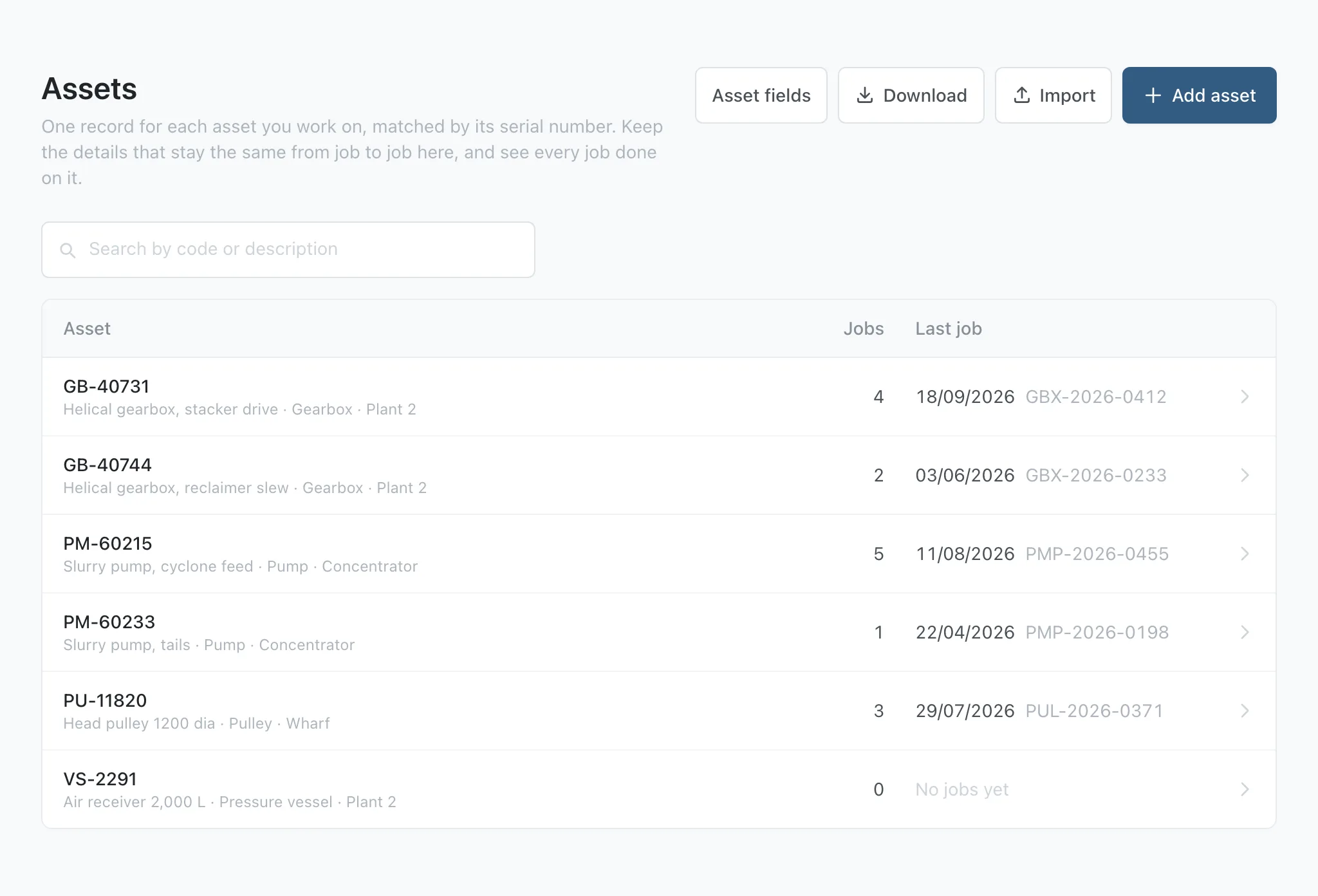
Every asset can have built-in details such as Make, Model and Date installed, plus Drawing number when your jobs record one, and you add your own. Open an asset and Stratum Track lists Jobs on this asset, newest first, and Changes: the latest changes to its details, who made each one, and whether it came from the register, a spreadsheet import or a job.
On the job, you decide which details your technician sees by placing them on a step. Each one shows the asset's value, marked From asset with the asset's code, so the technician reads it instead of typing it again.
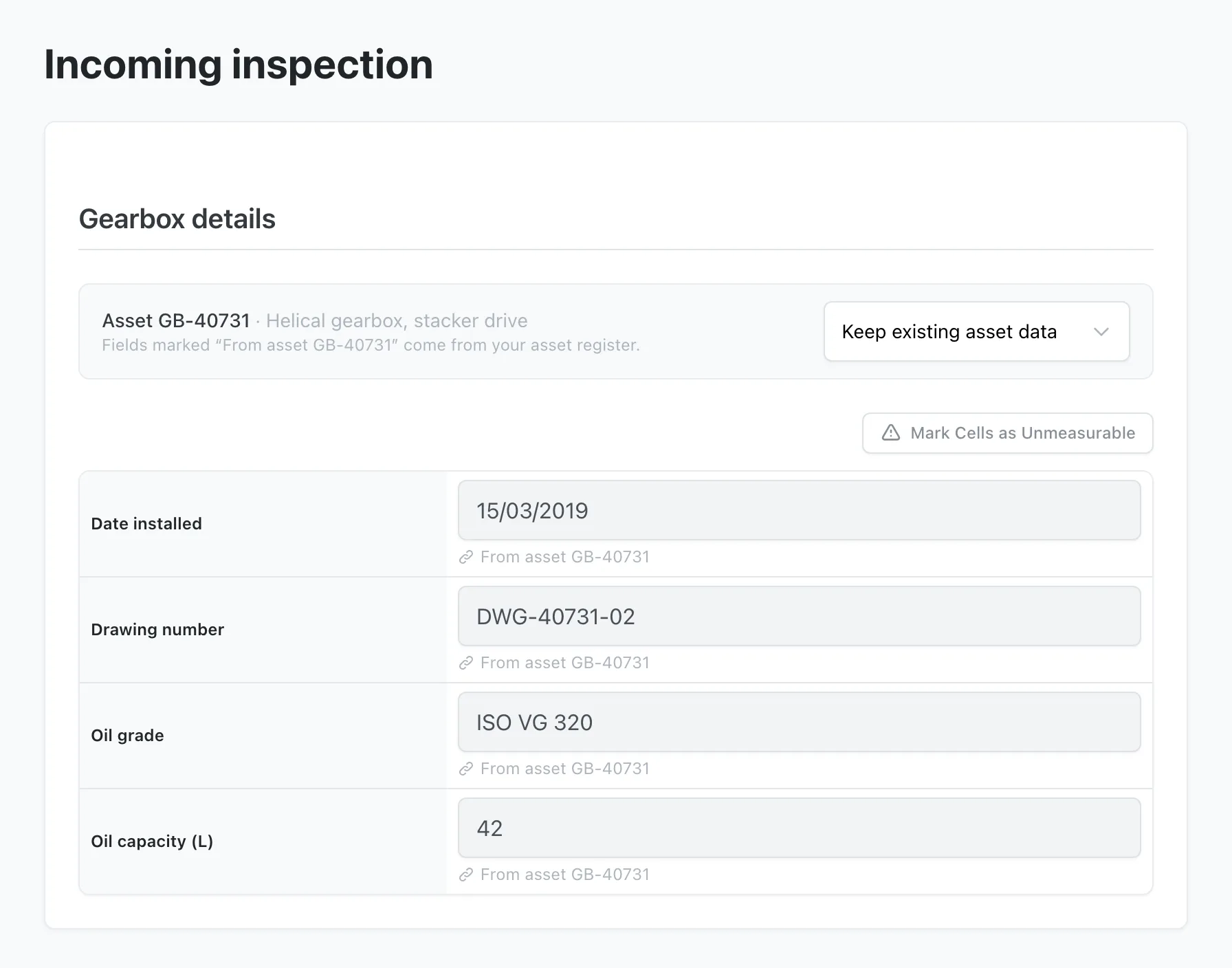
When your technician replaces a part and a detail changes, they choose I am updating this asset today from the menu above the details, correct the value, and Stratum Track saves it to the asset when they save the step. Every later job for that asset shows the new value, and the asset's Changes list records it against the job.
Stratum Track adds a new serial number to the register the first time a job is saved with it, and suggests assets from the register on the job form as the serial number is typed. Your report document prints any detail by its report name, such as {{ system.asset.installed_on }} for the install date.
Setting it up
You need a manager login, because the Assets tab is only on a manager's menu.
Step 1: Choose the field that names an asset
Open the Assets tab. Under Which job field names the asset?, Stratum Track lists each job field that can name an asset, with how many assets a build would make and a few example codes. Choose the one your team fills in with the asset's own number: Serial Number, Drawing number, Material Number, Designation or a one-line text field of your own.
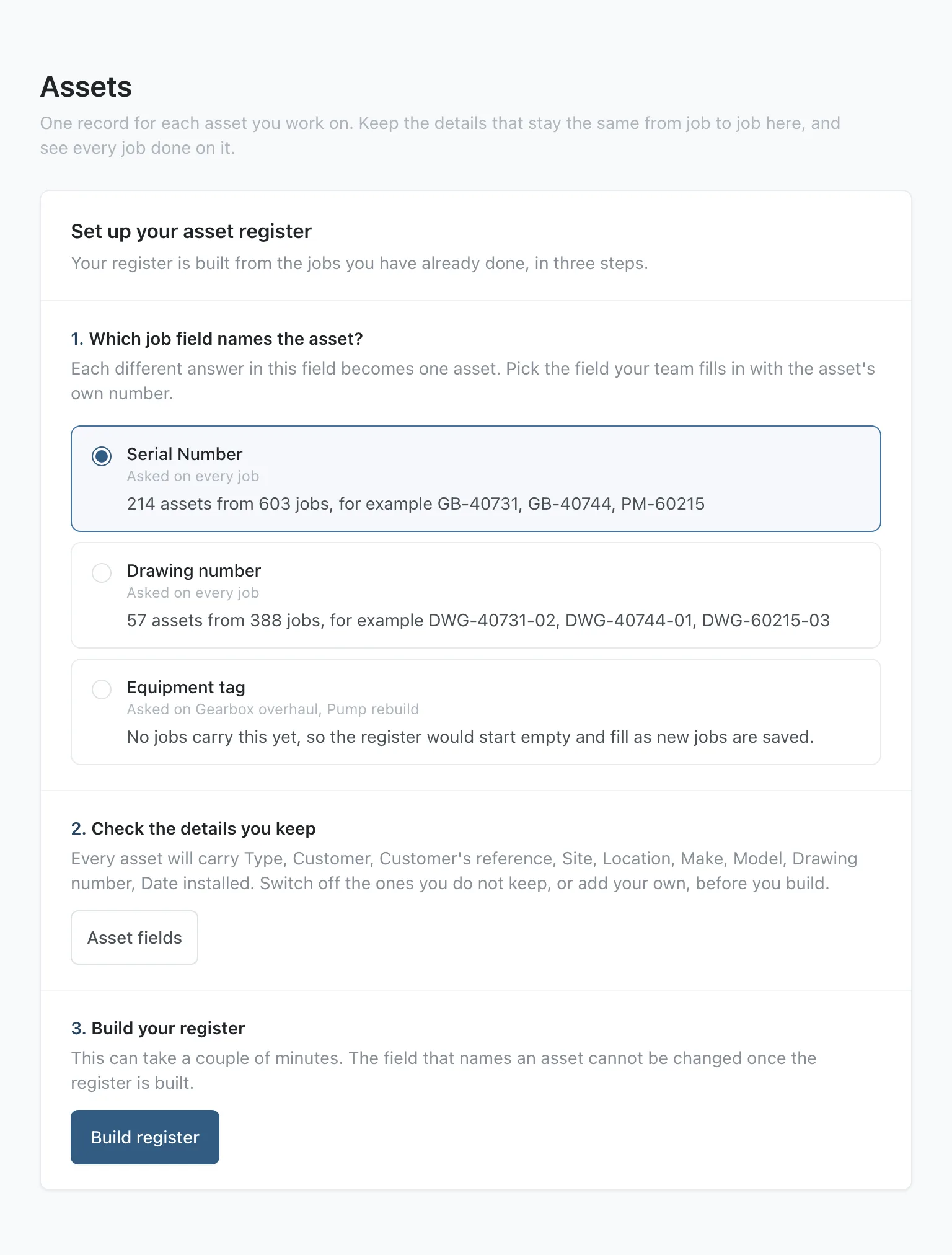
Once you build the register, the choice is fixed and you cannot switch that job field off.
Step 2: Check the details you keep
Press Asset fields. Switch off any built-in detail you do not keep, and press Add field for each of your own, such as an oil grade or an installed clearance. Each field takes a Report name, which your report document uses to print it.
Step 3: Build the register
Press Build register, then Build register again to confirm. The build can take a couple of minutes and keeps running if you leave the page.
Step 4: Add what the jobs did not record
Old jobs rarely record an install date. Open an asset to type its details, or press Import and upload an Excel file or a CSV with one row per asset and an Asset code column. Stratum Track updates the asset whose code is already in the register, adds an asset for a new code, and never deletes anything on import. If any row cannot be read, Stratum Track saves nothing from the file and names the row to fix.
Step 5: Show the details on a step
Go to Manage Templates, press Actions on your form, then Review. The form opens on the Preview tab. Add a text, number, measurement, date or dropdown field where the detail belongs, open its Report name and choose the detail from the list, such as Asset: Date installed. You can place the field on its own or in a table, but not in a table your technician adds rows to, and not in a repeating section.
On a form that already has jobs, Stratum Track saves the new field as a draft, and nothing changes on the tablet until you press Activate Template.
Questions people ask
Do I have to type my asset register in by hand?
No. Stratum Track builds it from the jobs you already have, one asset for every different serial number, or every different answer in the job field you choose. It fills the customer and site from the newest job that records them, and the description from the newest job's Designation. You add the details your old jobs never recorded, such as install dates, once, either on the asset itself or in a spreadsheet you import.
What happens to old reports when an asset's details change?
A report prints the asset's current value, so any report generated after the change carries the new one, including a report for an older job. Job Details shows the current value in the same way. A report you have already sent does not change. The asset's Changes list keeps the old value beside the new one, with who changed it, when, and on which job.
Can a technician change an asset's details?
Yes, from any step that shows them. Once they choose I am updating this asset today, they can edit the details, and Stratum Track saves what they change to the asset when they save the step, with their name and the job number on the asset's Changes list. Stratum Track does not update a detail behind a hold point that has not been signed. Only a manager can open the Assets tab to add, edit, import or delete assets.
Is this the same as the equipment register?
No. The Equipment Register, under Settings, holds your own test instruments and their calibration dates, and your technician picks the instrument they used on a step. The Assets tab holds the machines and vessels you inspect or repair for your customers, matched to each job by its serial number or the field you chose. One job can record both.
Do I need to ask you to switch this on?
No. The Assets tab is on every manager's menu today, and nothing reaches your jobs until you build the register. If you would rather we set it up with you, send us your fleet list and a few recent reports. We will choose the field that names your assets, load the details your jobs never recorded, and check the register with you before your team relies on it.