Articles · 2026-09-25
How to add your work instructions beside each question
We often see the method for a reading kept in a procedure binder in the office, which leaves the technician at the job to guess where to measure or to phone someone and ask. A reading taken in the wrong place means measuring again, and each call takes a supervisor away from their own work. With Stratum Track you write the instruction into the question itself, and the technician opens it from an information icon beside that question. It stays closed until they tap it, so all your team sees is a small icon.
You set this up once on the form, and it takes about a minute per question.
What you need
- A manager login. Only a manager can edit a form.
- A computer. The template editor is built for a desktop screen.
- The instruction you want the technician to read, from your procedure or work instruction.
Step 1: Open the form
Go to Manage Templates, click Actions on your form, then Review. The form opens on the Preview tab, which shows it as the technician sees it.
Step 2: Select the question
Click the question on the form. Its settings open in the panel beside the form, under Field settings. In a table, click the cell the technician fills in, not the heading beside it.
Step 3: Write the guidance
Type the instruction into the Guidance box: the method, the point to measure, or what counts as a defect. The box holds up to 2,000 characters and keeps your line breaks. Click Save changes at the foot of the panel.
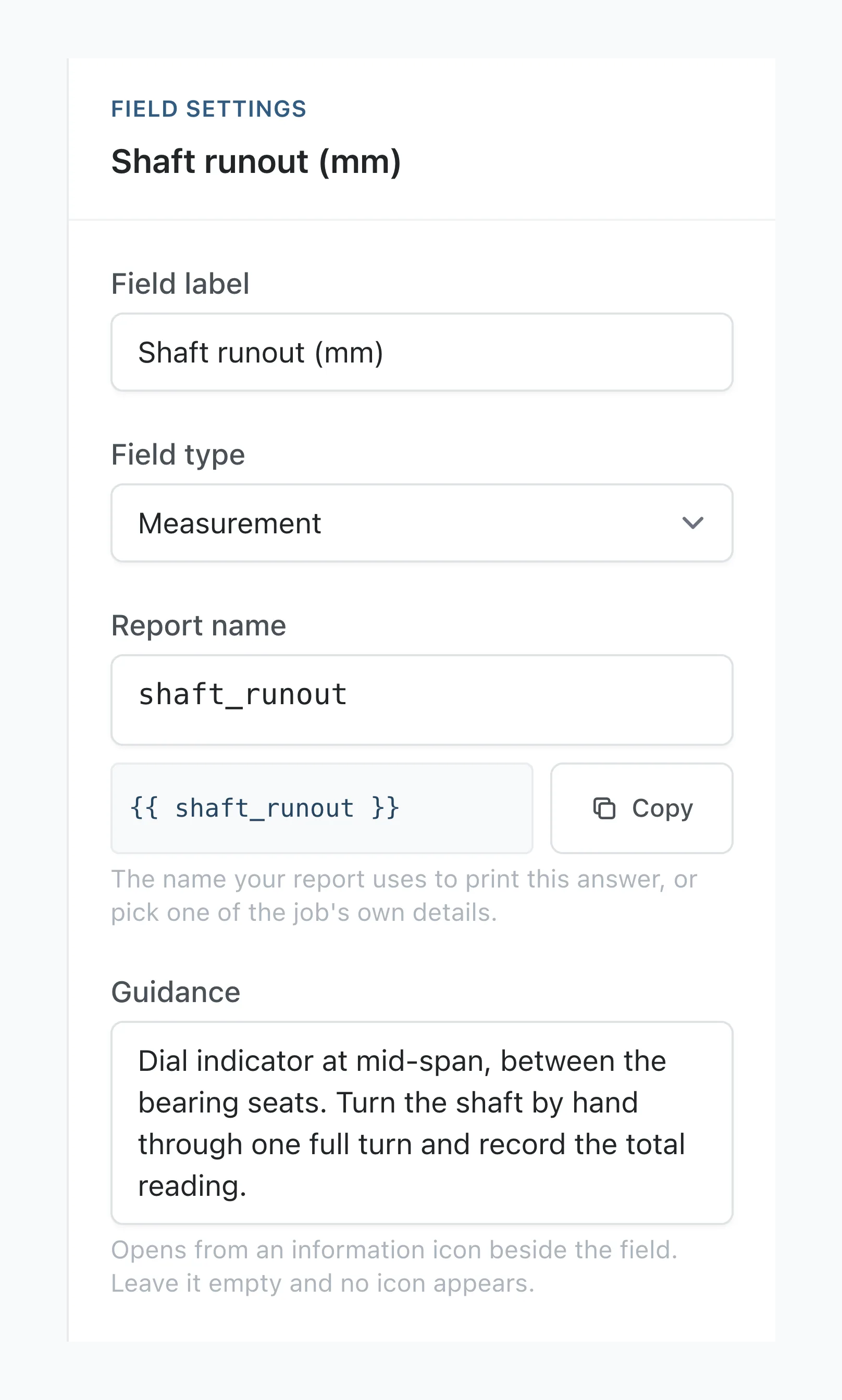
With no draft open, Stratum Track applies the guidance to every job on that form as soon as you save, including jobs already under way, and the technician sees it the next time they open the step. If the form already has a draft open, Stratum Track adds the guidance to that draft and applies it to your jobs when you click Activate Template.
The Structure tab has the same Guidance box on each field's card, if you prefer to work there. To remove guidance, empty the box and save.
Step 4: Check it on a job
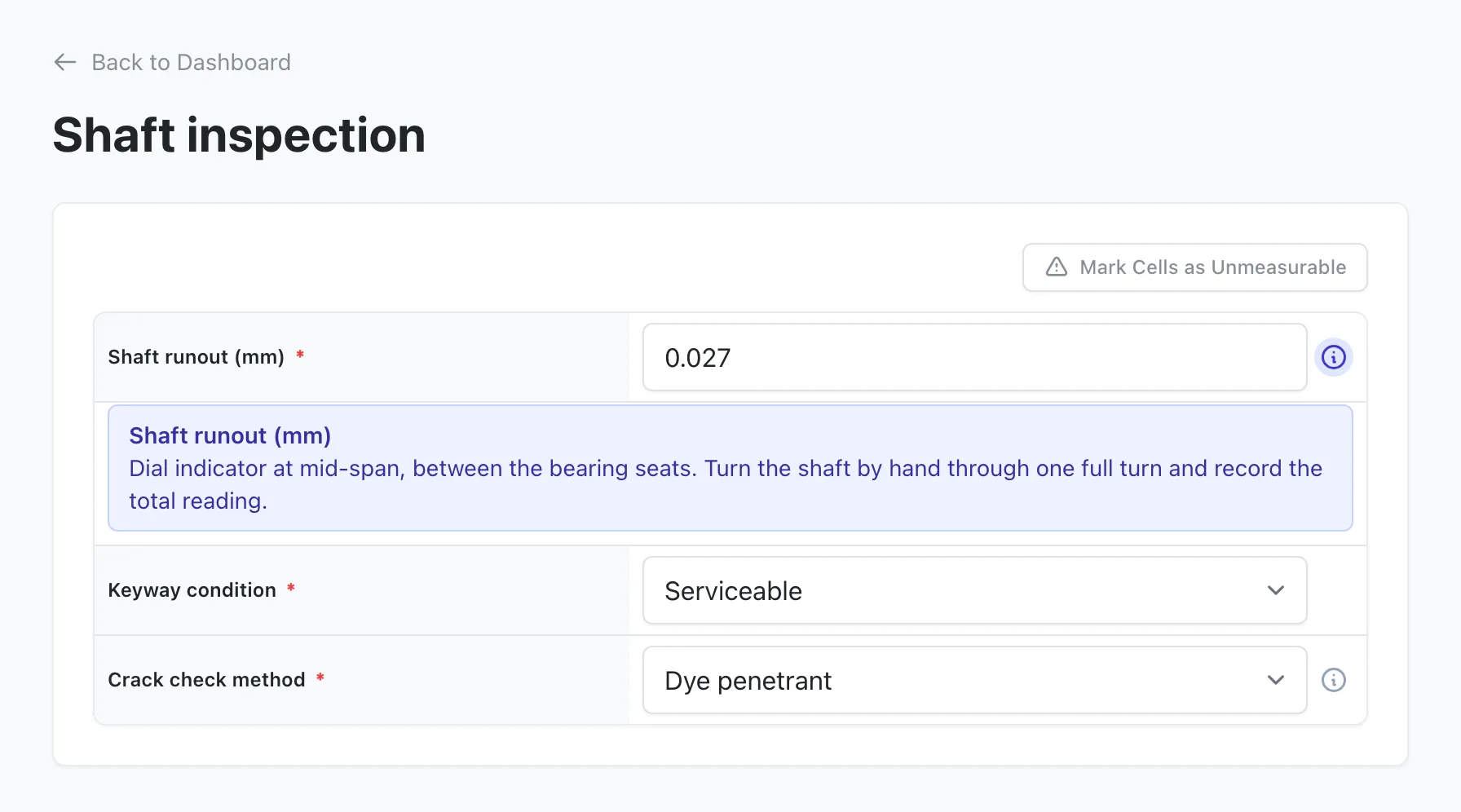
Open a job on that form and open the step. Stratum Track shows an information icon on each question that has guidance:
- A question on its own has the icon beside its label, and the guidance opens under the label.
- A cell in a table has the icon beside its answer box, and the guidance opens in a new row directly beneath it, headed with the question's name.
- A table where the technician adds rows has one icon in the column heading, and the guidance opens under the table.
The technician taps the icon to open the guidance, and taps it again or taps anywhere outside the guidance to close it. Opening one closes any other. On a question below a hold point nobody has signed yet, the icon shows faded and opens once the hold point is signed.
Worth knowing
- Guidance is plain text. Stratum Track keeps your line breaks and applies no other formatting.
- Job Details and the report do not show it. Your technicians see it on the step, and you see the icon on the Preview tab.
- Only a cell the technician answers has a Guidance box. A heading, a label, a calculation, a specification and a cell filled from a job table have none.
Common questions
Will the icons clutter the form for experienced technicians?
No. The guidance stays closed until someone taps its icon, and a question without guidance has no icon at all, so an experienced technician can ignore them. When one is open, a tap on an answer box closes the guidance and puts the cursor in that box in the same tap, so the technician does not need a second tap before typing the reading.
Does guidance work on a question from a step template or a common field?
A question from a step template takes its guidance from the step template. The panel on your form names the step template and links to it, and Stratum Track updates every job template using it when you activate the change. A common field shares its label, its type and that type's settings, such as a dropdown's options or a measurement's decimal places, with every form that uses it. Guidance is not shared, so write it on each form.
Does uploading a new Word report document remove the guidance?
Not with Merge, the recommended choice, or Replace DOCX Only. Merge matches each question in the new document to the one already on the form by its report name, and a matched question keeps its guidance, as it keeps its field type and its Required setting. If you change a question's report name in the Word document, Stratum Track treats it as a new question, so write its guidance again after the upload. Full Reprocess rebuilds every question from scratch and removes all guidance on the form.
Do I need to ask you to switch this on?
No. Guidance is available on every form, for every company, and any manager can write it. Every question a technician answers has a Guidance box, on the form or on the step template it came from. If you would rather we did it with you, send us your work instructions and we will write the guidance into the questions they cover.