Articles · 2026-10-13
Who changed the reading, and what did it say before?
A client rings about a gearbox you reported on in March. Your report gives the drive end journal as 79.980 mm, inside tolerance. Their fitter measured it at 79.96 on reassembly, and the client asks whether 79.980 is what your technician measured or a number that was changed afterwards.
The job sheet says 79.980. If a different figure was ever in that box, it was typed over. The supervisor who checked the report corrected two readings that week, and nothing on the sheet says which two.
Correcting a reading is ordinary work. The record kept only the last number.
What it costs
An afternoon goes on phone calls and a search through old emails to rebuild what happened to one number. At the end of it there is still no record of the earlier figure.
An assessor asks the same question. ISO/IEC 17025 clause 7.5.2 expects a laboratory to trace an amended technical record back to the earlier version, and to keep the original and the amended data with the date of the change and the person responsible. A cell that was typed over holds the amended value alone.
What good looks like
Each change to a recorded answer keeps the earlier value, the person who changed it and the time. The history is shown beside the answer, on the screen the person is already reading. Putting an earlier value back is recorded like any other change.
How Stratum Track does it
Answer history is part of the October 2026 release. It is on for every company, with nothing to switch on, and it records changes made from that release onward.
When an answer on a step is changed, Stratum Track shows a clock marker beside it.
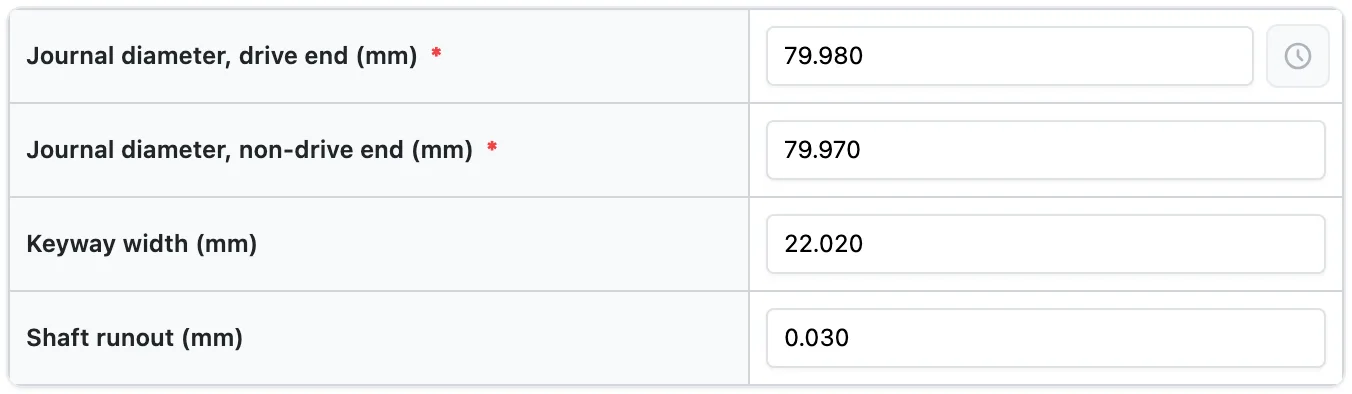
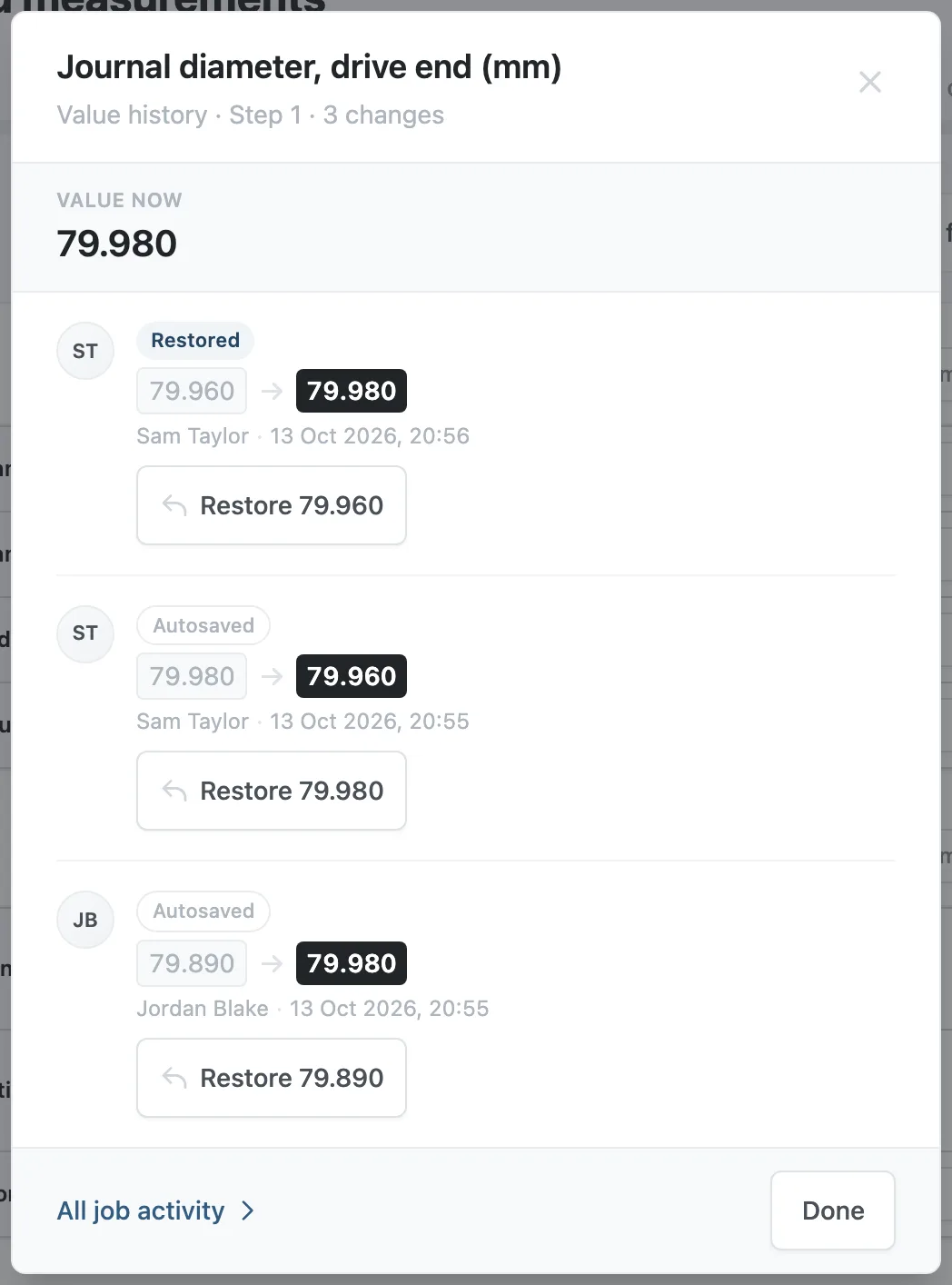
Pressing the marker opens the Value history panel: the value now, then each change with the earlier value, the new value, the person and the time.
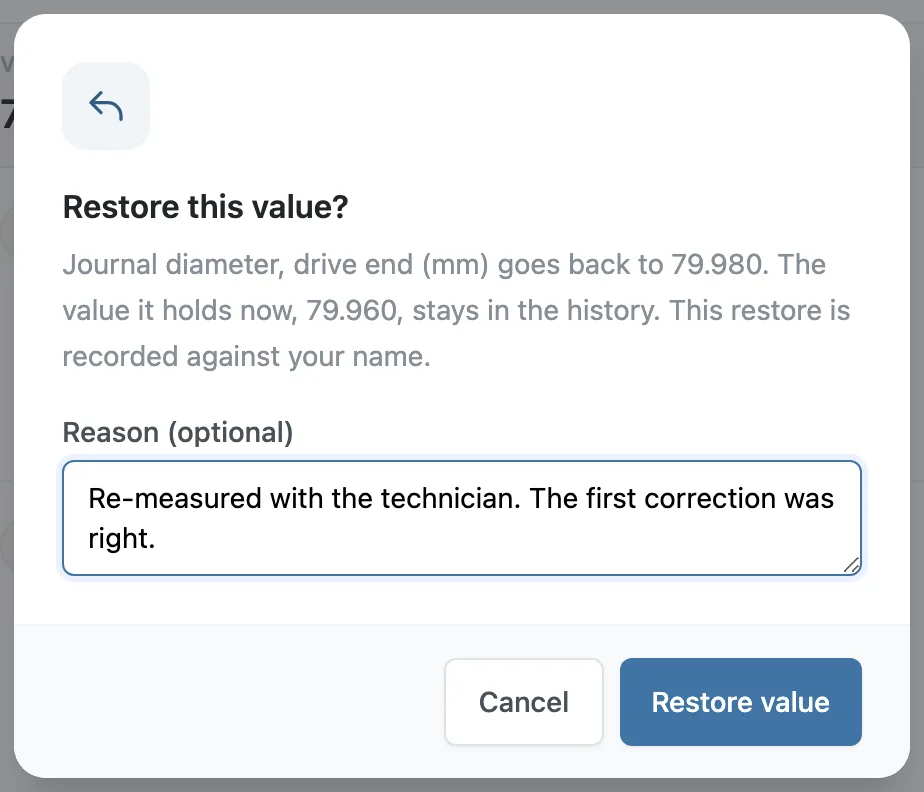
A manager can put an earlier value back. Stratum Track asks for a reason, which is optional, and records the restore against the manager's name as a new line in the history. The value it replaced stays in the history.
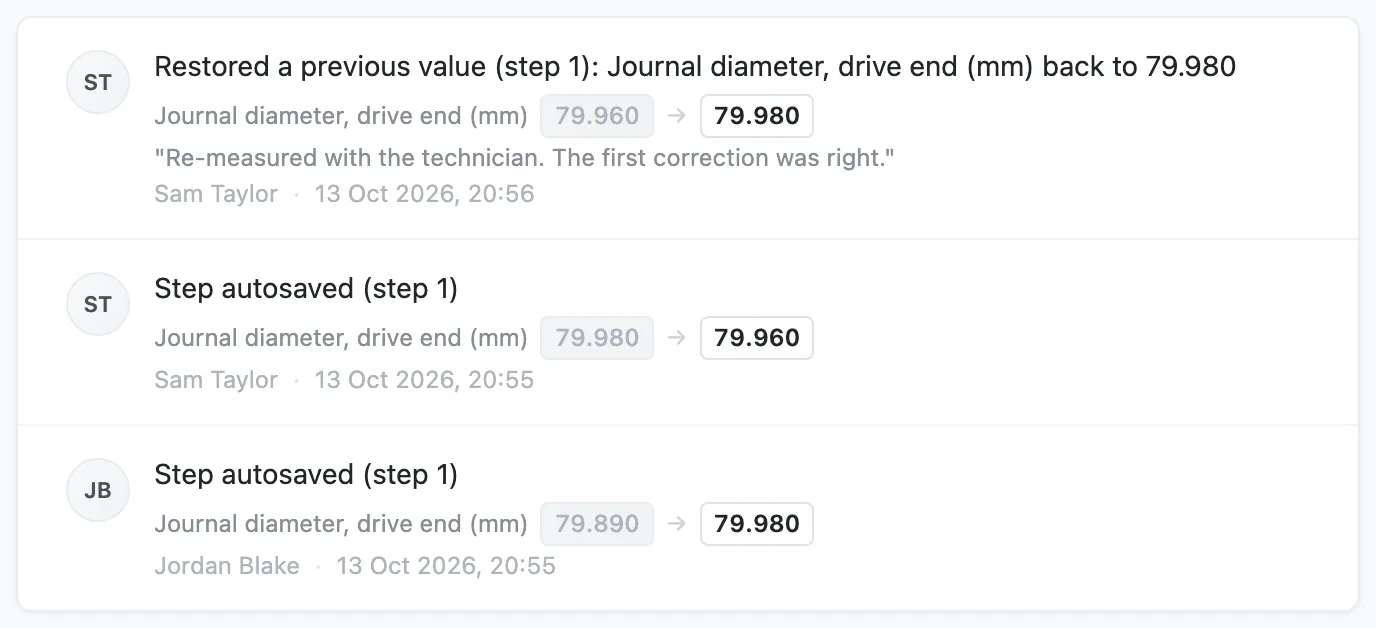
The job's Activity page lists changes save by save, with the old and the new value under each line.
The report prints the answer as it stands and none of the history.
Reading and restoring a value
Step 1: Open the history
Open the step and press the clock marker. On a field outside a table the marker is a pill that reads 1 change or 3 changes. In a table it is a clock icon in the cell.
Step 2: Read each change
The panel shows Value now at the top. Each entry gives the earlier value, the new value, the person's name, and the date and time in your workshop's time zone. Edits one person makes within five minutes are folded into one line, with a link that shows the changes in between. An answer that was emptied reads Cleared.
Step 3: Restore an earlier value
A manager presses Restore on the entry. The button carries the value it puts back, such as Restore 79.890. The Restore this value? dialog states that value and the value the field holds now. Type a reason if you want one on the record, then press Restore value. The page reloads at the field with the restored value in it. A technician reads the same history and has no Restore button.
Step 4: See every change on the job
Press All job activity in the panel, or Show full history on Job Details. A save that changed several answers lists the first three and gives a count of the others, which are in each field's own history.
Questions people ask
Can a technician undo a change?
A technician can type a different value, and Stratum Track records that as another change under their name. Restoring an earlier value from the history is for managers. In both cases the earlier values stay listed, so a reading changed from 79.890 to 79.980 and then back to 79.890 shows both changes.
Can anyone edit or delete the history?
No screen in Stratum Track edits or removes a line of history, and a restore adds a line. The history also survives a change to the form: if the field is renamed or removed later, each line keeps the label and the values as they were. History is removed only when a manager deletes the job, which can be done once the job is archived.
Is every change recorded?
Changes to typed and picked answers are recorded: text, numbers, measurements, dates, times, dropdowns, yes or no answers, lookups and equipment, in single fields, table cells, rows a technician added and item checklists. The first answer typed into an empty field is the original, so it is not listed as a change. Photos, videos and signatures have no value history, and the Activity page records when one is uploaded, deleted or replaced. Calculated fields and job details such as the customer or the order number are not covered. At a company that has not switched on offline working, a correction a person makes to their own answer within five minutes of first giving it shows no marker.
What about an answer changed with no signal?
Offline working is off until a manager switches it on under Settings, Offline Access. With it on, a change made with no signal is kept on the tablet and sent when signal returns. Stratum Track dates the change by the time it was made on the tablet and stores the time it arrived as well. When the two are more than a minute apart, the panel reads recorded offline, received with the arrival time. With no signal the marker does not open, and the tablet says Reading what this value used to be needs signal.
Does this make our records compliant with ISO/IEC 17025?
No. Your quality system decides what evidence you keep, and your accreditation is yours. Stratum Track records each amendment as it is made: the earlier value, the new value, the person who made the change and the time. Whether that meets your procedures is for you and your assessor to decide.