Articles · 2026-09-01
Which instrument took the reading, and was it in calibration?
An auditor pulls a report off the pile and asks which flaw detector took this reading, and whether it was in calibration on the day.
The instrument number is on the report, typed into a box at the time. The calibration certificate for that instrument is in a folder on the server, or still with the calibration house. The register that ties the two together is a spreadsheet that one person keeps, so everyone else has to ask for it. Somebody now matches a number typed in March against a certificate filed in February, while the auditor waits.
It nearly always lines up, and proving that takes twenty minutes every time somebody asks. Once or twice a year it does not, because a due date passed while the instrument was on the bench and nobody on the floor had any way to know.
What it costs
The larger cost is a reading taken on an instrument that had gone out of calibration, found weeks later by somebody checking the paperwork, long after it went back on the shelf.
Everything that instrument touched between the due date and the day it was found is now in question. That is a retest, a report withdrawn and reissued, and an awkward call to the client. The technician did nothing wrong. The due date was recorded somewhere they never see, so nothing warned them while the instrument was in their hand.
What good looks like
Keep the due date with the instrument in one register, so a reminder and a spreadsheet cannot disagree. Show its calibration state to the person picking it up, on the screen they are already filling in. Fill the instrument's details on the report from the register.
None of this should block the work. Somebody on site at six in the morning cannot fix a calibration record, and if the system stops them the job gets done on paper and the record is lost.
How Stratum Track does it
Your instruments live in one Equipment Register, in Settings. Each one carries its description, serial number, type, manufacturer, model, range, when it was last calibrated, when calibration is next due, and the certificate number.
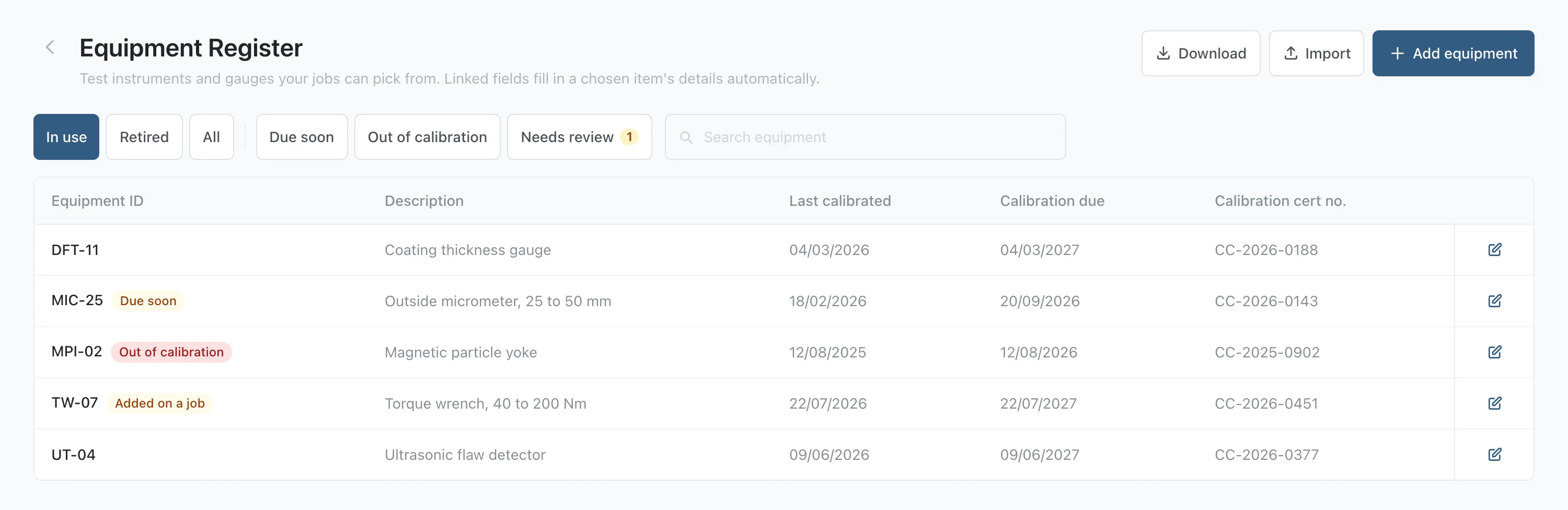
Stratum Track marks the state on the row. An instrument whose due date has passed carries a red Out of calibration chip, one due inside thirty days carries an amber Due soon, and the filter row at the top shows either list on its own. An instrument with no due date recorded carries no chip and gets no warning.
On the job, your technician picks the instrument from that register and Stratum Track fills in the fields you have linked.
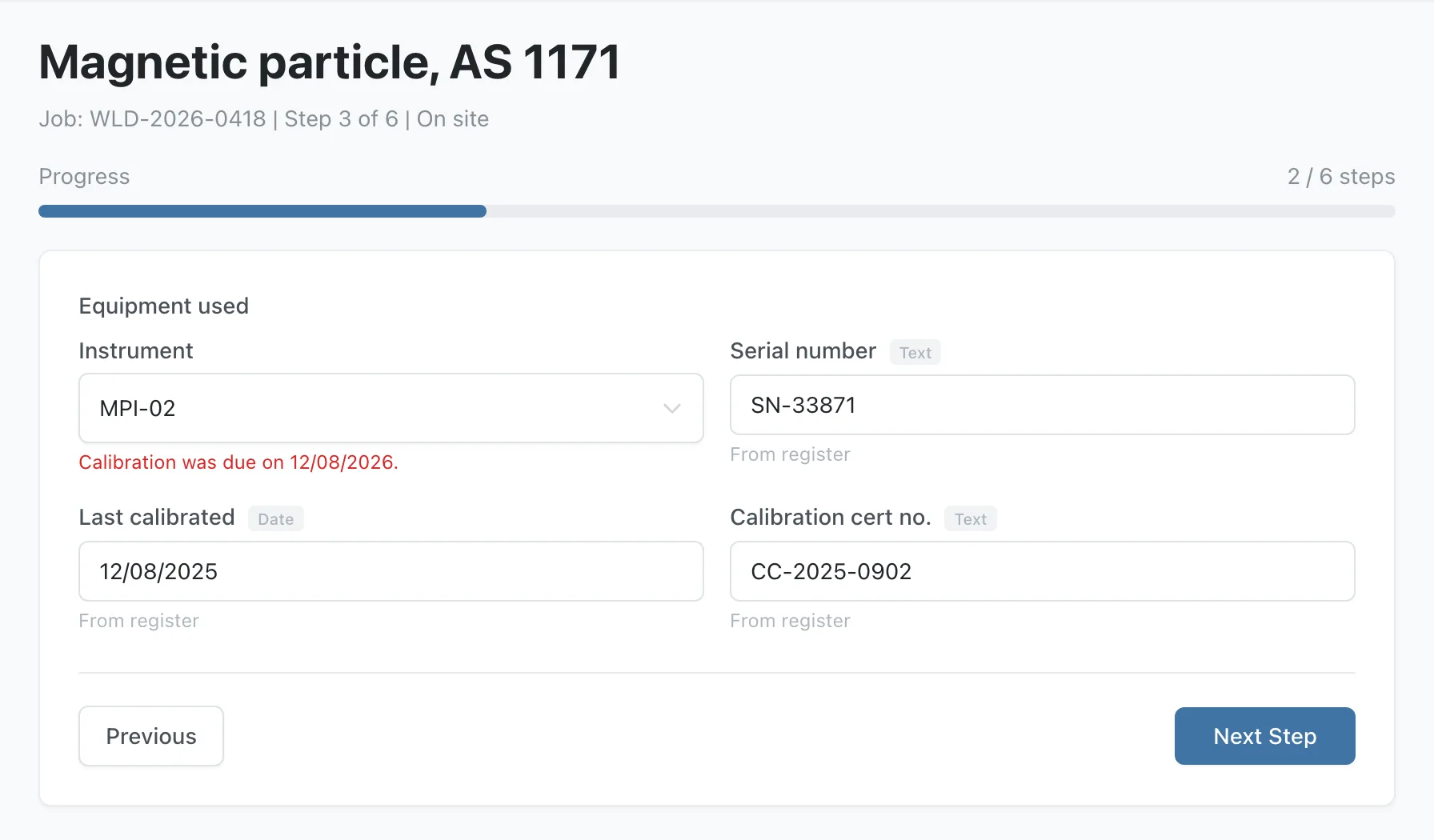
If the instrument they picked is overdue, Stratum Track says so under the picker, with the date: Calibration was due on 12/08/2026. The technician can carry on, and the record shows the warning was on the screen when they picked the instrument.
Setting it up
Step 1: Load the register
Go to Settings, then Equipment Register. Press Add equipment to type one in, or Import to load the whole sheet at once.
The import takes an Excel file or a CSV. The first row names the columns, one column has to hold the Equipment ID, and Stratum Track also recognises headings like Asset No and Tag No. Write dates as dd/mm/yyyy. A column it does not recognise is left out and it tells you which one.
Importing again is safe. An ID it already has updates that row, an ID it has not seen is added, and nothing is ever deleted or retired by an import, so you can keep editing the register in your spreadsheet.
Step 2: Put the picker on the step
Open Templates, open the template with Actions, then Review. Add a field to the step your technician records the test on, and set Field Type to Equipment, which makes it the picker your other fields follow.
Step 3: Link the details you want filled in
Add an ordinary field for each detail you want on the record: serial number, last calibrated, certificate number, whatever your report prints. Open its settings and press Link to the equipment register, choose the Equipment picker it follows, choose the Detail to fill, then Save link.
Your technician picks once and every linked field fills from that instrument. They can still type over any of them, and Stratum Track shows what the register said.
Step 4: Add an instrument from the job
A technician who reaches for a gauge that nobody has entered can add it from the job without stopping. The new row goes into the register marked Added on a job, and a Needs review count appears at the top of the register so a manager can check it and complete it.
Questions people ask
Does Stratum Track stop a job when the instrument is out of calibration?
No. It shows the technician a plain sentence with the date, in red, as they pick the instrument, and lets them carry on. We chose that deliberately. A technician on site cannot recalibrate anything, and a picker that refuses them is a picker they work around by typing the number in by hand, which loses you both the warning and the record. You get a record that the state was on the screen when the instrument was picked.
Where does the thirty days come from?
Thirty days is about the booking lead time for a calibration house, so an instrument that turns amber can still go out and come back without leaving service unexpectedly. Inside that window the register shows an amber Due soon chip beside the instrument, and the filter row at the top shows that list on its own. An instrument is treated as in calibration up to and including its due date, not the day before.
Can I still keep the register in a spreadsheet?
You can keep working from your spreadsheet and import it whenever it changes. Nothing is deleted by an import and a column your file leaves out is left as it is, so a partial sheet updates only what it carries. You can also press Download to export the register as a CSV, edit it, and import it again.
Does this make my records compliant?
No, and be careful of anybody who says otherwise. Your quality system decides what evidence you keep, and your accreditation is yours. Stratum Track records the evidence as the work is done: the instrument on the report is the one your technician picked, its certificate number came from your register, and the calibration state it was in on the day is on the job.
Is the equipment register switched on for everyone?
Yes. Every company has the Equipment Register under Settings, and every form can use the Equipment field type, so a manager can load the register and connect a step to it today. If you would rather we set it up with you, send us your instrument list with its calibration due dates and we will load your register with you.